> ## Documentation Index
> Fetch the complete documentation index at: https://docs.altnautica.com/llms.txt
> Use this file to discover all available pages before exploring further.
# Agent dashboard: Extensions
> List, enable, disable and install extensions from the agent's browser dashboard.
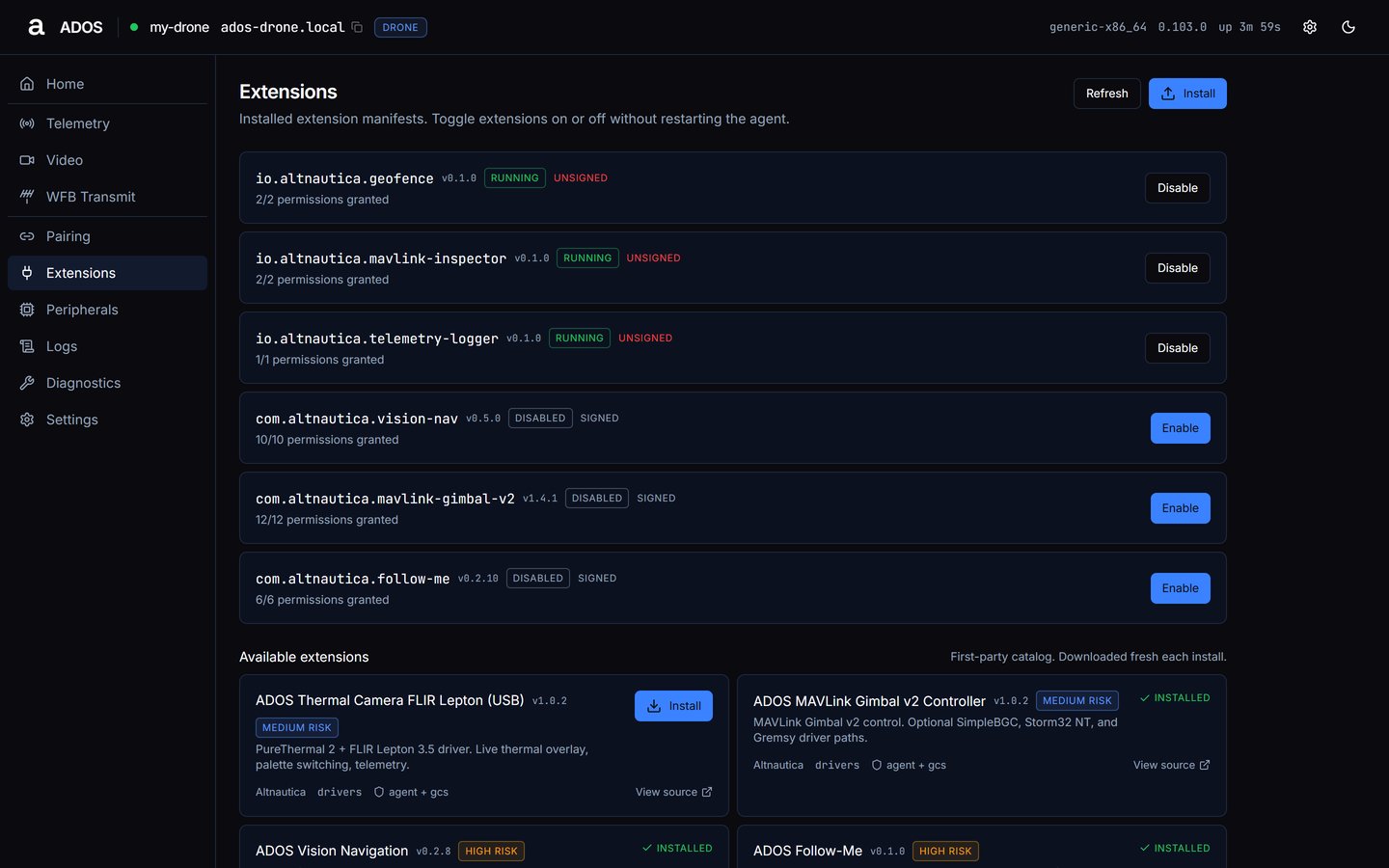
Extensions is a shared page at `/extensions`: installed extension manifests. Toggle extensions on or off without restarting the agent.
 ## Installed extensions
Each row shows the plugin id, version, status, signed or unsigned, how many permissions are granted (`X/Y permissions granted`), and one **Enable** or **Disable** button:
* **Disable** confirms that "The extension will stop processing immediately. Any background work is killed."
* **Enable** confirms that "The extension will start with its declared capabilities."
With nothing installed the list reads **No extensions installed.**
The dashboard has no detail panel. Remove an extension or change its grants from Mission Control or `ados plugin`.
## Install
Drop a `.adosplug` file anywhere on the window, or press **Install**. The install runs in two stages:
Shows the risk badge, signed or unsigned (with the signer), license and what the extension adds. Press **Continue**.
Lists each permission with its grade, marked required or optional. A high or critical risk extension needs the box "I understand this plugin can take ``-risk actions" and a short cool-off (the button reads **Wait N…**) before **Approve and install** enables.
The agent checks the extension's signature before it installs it. See [Signing keys](/developers/signing-keys) and [Permissions](/developers/permissions) for what each grade means.
Installing, enabling or disabling an extension is refused while the vehicle is armed, because an extension can feed pose or setpoints to the flight controller. See [Safety interlocks](/drone-agent/dashboard-overview#safety-interlocks).
## Catalog
The **Available extensions** grid lists the first-party catalog, which the agent downloads fresh for each install. Each card shows name, version, risk, description, author, category, the halves the extension ships (for example `agent + gcs`), **View source**, and **Install** or installed. Each extension is described in the [Extensions catalog](/drone-agent/extensions-catalog).
## Data sources
| Endpoint | Used for |
| - | - |
| `GET /api/plugins` | installed list, every 8 s |
| `GET /api/v1/plugins/catalog` | Available extensions, every 30 s |
| `POST /api/plugins/parse`, `POST /api/plugins/parse_from_url` | reading a package before install |
| `POST /api/plugins/install`, `POST /api/plugins/install_from_url` | install |
| `POST /api/plugins/{id}/enable`, `POST /api/plugins/{id}/disable` | the toggle |
Grant, revoke and remove (`POST /api/plugins/{id}/grant`, `DELETE /api/plugins/{id}/perms/{permission_id}`, `DELETE /api/plugins/{id}`) are used by Mission Control and the CLI.
## Next steps
Registered peripheral manifests and their state.
How extensions run on the agent.
This documentation is built and hosted on [Mintlify](https://mintlify.com), a developer documentation platform.
## Installed extensions
Each row shows the plugin id, version, status, signed or unsigned, how many permissions are granted (`X/Y permissions granted`), and one **Enable** or **Disable** button:
* **Disable** confirms that "The extension will stop processing immediately. Any background work is killed."
* **Enable** confirms that "The extension will start with its declared capabilities."
With nothing installed the list reads **No extensions installed.**
The dashboard has no detail panel. Remove an extension or change its grants from Mission Control or `ados plugin`.
## Install
Drop a `.adosplug` file anywhere on the window, or press **Install**. The install runs in two stages:
Shows the risk badge, signed or unsigned (with the signer), license and what the extension adds. Press **Continue**.
Lists each permission with its grade, marked required or optional. A high or critical risk extension needs the box "I understand this plugin can take ``-risk actions" and a short cool-off (the button reads **Wait N…**) before **Approve and install** enables.
The agent checks the extension's signature before it installs it. See [Signing keys](/developers/signing-keys) and [Permissions](/developers/permissions) for what each grade means.
Installing, enabling or disabling an extension is refused while the vehicle is armed, because an extension can feed pose or setpoints to the flight controller. See [Safety interlocks](/drone-agent/dashboard-overview#safety-interlocks).
## Catalog
The **Available extensions** grid lists the first-party catalog, which the agent downloads fresh for each install. Each card shows name, version, risk, description, author, category, the halves the extension ships (for example `agent + gcs`), **View source**, and **Install** or installed. Each extension is described in the [Extensions catalog](/drone-agent/extensions-catalog).
## Data sources
| Endpoint | Used for |
| - | - |
| `GET /api/plugins` | installed list, every 8 s |
| `GET /api/v1/plugins/catalog` | Available extensions, every 30 s |
| `POST /api/plugins/parse`, `POST /api/plugins/parse_from_url` | reading a package before install |
| `POST /api/plugins/install`, `POST /api/plugins/install_from_url` | install |
| `POST /api/plugins/{id}/enable`, `POST /api/plugins/{id}/disable` | the toggle |
Grant, revoke and remove (`POST /api/plugins/{id}/grant`, `DELETE /api/plugins/{id}/perms/{permission_id}`, `DELETE /api/plugins/{id}`) are used by Mission Control and the CLI.
## Next steps
Registered peripheral manifests and their state.
How extensions run on the agent.
This documentation is built and hosted on [Mintlify](https://mintlify.com), a developer documentation platform.