> ## Documentation Index
> Fetch the complete documentation index at: https://docs.altnautica.com/llms.txt
> Use this file to discover all available pages before exploring further.
# Home
> The dashboard landing page. Live tiles, video, FC, hardware, network, cloud, services.
# Home
The dashboard's `/home` route is the live operations board. It renders
two layouts depending on profile: a drone-focused board with flight
telemetry tiles and a video panel, and a ground-station board with WFB
receive plus mesh tiles.
## Drone profile
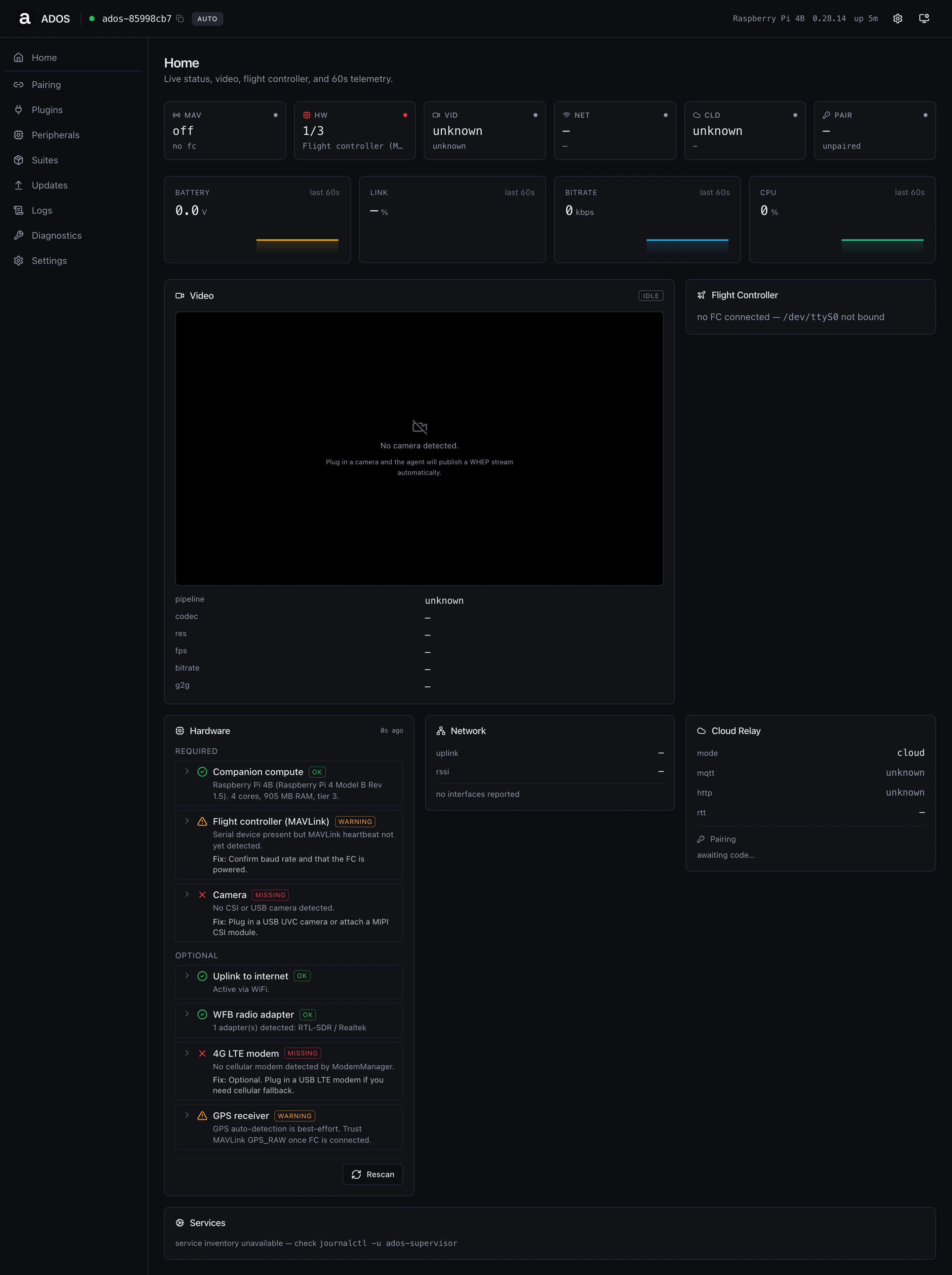 ### Tiles
| Tile | Source |
| ---- | ------------------------------------------------- |
| MAV | MAVLink heartbeat state |
| HW | Required-component count from hardware check |
| VID | Video pipeline state (`running`, `idle`, `error`) |
| NET | Active uplink kind and signal |
| CLD | Cloud relay MQTT and HTTP state |
| PAIR | Pairing state and current code |
### Sparklines
A 60-second history of battery voltage, link percent, video bitrate, and
CPU draw. Each chart updates every poll tick (about 1 Hz) from the
dashboard snapshot endpoint.
### Panels
* **Video**: the live stream. WHEP first, HLS fallback, snapshot
fallback. Reads encoder details (codec, resolution, fps, bitrate,
glass-to-glass latency) from the snapshot.
* **Flight Controller**: connection state, vehicle type, firmware,
mode, arm state, GPS fix and satellites, battery voltage and remaining,
RC link, prearm.
* **Hardware**: the required and optional component list, the
same rows the wizard's hardware check used.
* **Network**: active uplink, RSSI, IP addresses by interface.
* **Cloud Relay**: MQTT, HTTPS heartbeat, RTT, pairing state.
* **Services**: quick health line for the systemd unit set.
## Ground-station profile
### Tiles
| Tile | Source |
| ---- | ------------------------------------------------- |
| MAV | MAVLink heartbeat state |
| HW | Required-component count from hardware check |
| VID | Video pipeline state (`running`, `idle`, `error`) |
| NET | Active uplink kind and signal |
| CLD | Cloud relay MQTT and HTTP state |
| PAIR | Pairing state and current code |
### Sparklines
A 60-second history of battery voltage, link percent, video bitrate, and
CPU draw. Each chart updates every poll tick (about 1 Hz) from the
dashboard snapshot endpoint.
### Panels
* **Video**: the live stream. WHEP first, HLS fallback, snapshot
fallback. Reads encoder details (codec, resolution, fps, bitrate,
glass-to-glass latency) from the snapshot.
* **Flight Controller**: connection state, vehicle type, firmware,
mode, arm state, GPS fix and satellites, battery voltage and remaining,
RC link, prearm.
* **Hardware**: the required and optional component list, the
same rows the wizard's hardware check used.
* **Network**: active uplink, RSSI, IP addresses by interface.
* **Cloud Relay**: MQTT, HTTPS heartbeat, RTT, pairing state.
* **Services**: quick health line for the systemd unit set.
## Ground-station profile
 ### Tiles
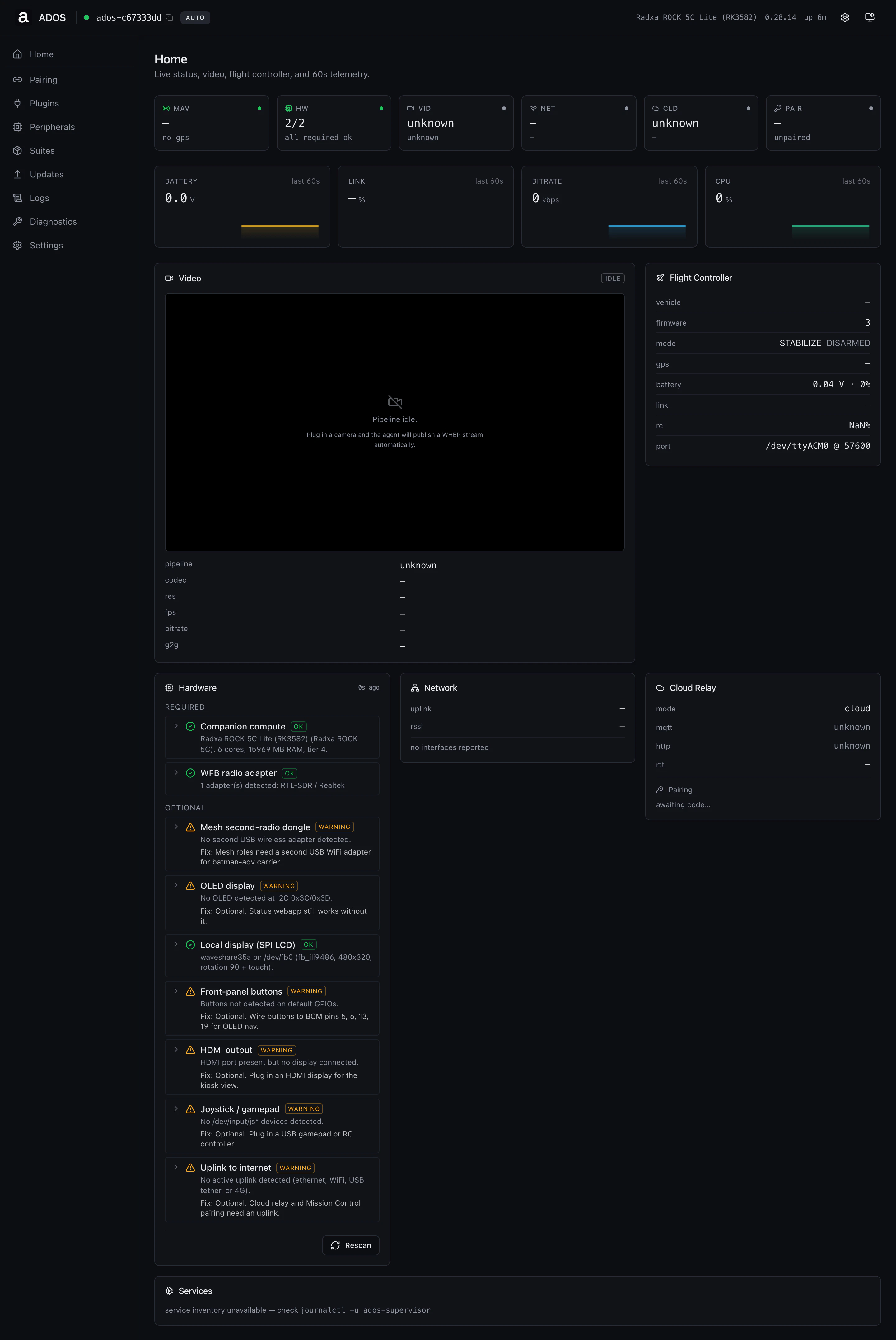
Same chrome as the drone home, with link tiles oriented toward the
receive side (WFB-rx, mesh peers, downlink quality).
### Panels
* **WFB Receive**: adapter, channel, RSSI, packet loss, FEC
counters, active streams.
* **Mesh**: visible when the node's role is `relay` or `receiver`.
Shows batman-adv peers, gateway node, partition state, and the local
mesh address.
* **Sources**: visible only on the `receiver` role. Aggregated
bitrate, frames combined, dedup, per-relay FEC stats.
* **Hardware**, **Network**, **Cloud Relay**, **Services**: same
set as on the drone home.
## Backend endpoints
| Method | Path | Used by |
| ------ | ---------------------------- | -------------------------------------- |
| GET | `/api/v1/dashboard/snapshot` | All panels (single aggregator, \~1 Hz) |
| GET | `/api/v1/setup/status` | Top-bar device card, profile gating |
| GET | `/api/status/full` | Uptime, board info |
## Troubleshooting
The snapshot endpoint takes a couple of polls to populate. Wait 5-10
seconds. If they stay unknown, check that the `ados-supervisor` service
is running in Diagnostics.
The agent did not see a UVC or CSI camera. Open Peripherals and confirm
the camera enumerates. The detection is hot-plug aware, so plugging the
camera in should resolve within a poll cycle.
The agent is unpaired. Open Pairing, copy the code, paste it into
Mission Control. The relay reconnects automatically after a successful
pair.
## Related
* [Pairing UI](/drone-agent/dashboard-pairing)
* [Video UI](/drone-agent/dashboard-video)
* [Diagnostics UI](/drone-agent/dashboard-diagnostics)
* [Per-profile visibility](/drone-agent/dashboard-per-profile)
### Tiles
Same chrome as the drone home, with link tiles oriented toward the
receive side (WFB-rx, mesh peers, downlink quality).
### Panels
* **WFB Receive**: adapter, channel, RSSI, packet loss, FEC
counters, active streams.
* **Mesh**: visible when the node's role is `relay` or `receiver`.
Shows batman-adv peers, gateway node, partition state, and the local
mesh address.
* **Sources**: visible only on the `receiver` role. Aggregated
bitrate, frames combined, dedup, per-relay FEC stats.
* **Hardware**, **Network**, **Cloud Relay**, **Services**: same
set as on the drone home.
## Backend endpoints
| Method | Path | Used by |
| ------ | ---------------------------- | -------------------------------------- |
| GET | `/api/v1/dashboard/snapshot` | All panels (single aggregator, \~1 Hz) |
| GET | `/api/v1/setup/status` | Top-bar device card, profile gating |
| GET | `/api/status/full` | Uptime, board info |
## Troubleshooting
The snapshot endpoint takes a couple of polls to populate. Wait 5-10
seconds. If they stay unknown, check that the `ados-supervisor` service
is running in Diagnostics.
The agent did not see a UVC or CSI camera. Open Peripherals and confirm
the camera enumerates. The detection is hot-plug aware, so plugging the
camera in should resolve within a poll cycle.
The agent is unpaired. Open Pairing, copy the code, paste it into
Mission Control. The relay reconnects automatically after a successful
pair.
## Related
* [Pairing UI](/drone-agent/dashboard-pairing)
* [Video UI](/drone-agent/dashboard-video)
* [Diagnostics UI](/drone-agent/dashboard-diagnostics)
* [Per-profile visibility](/drone-agent/dashboard-per-profile)