> ## Documentation Index
> Fetch the complete documentation index at: https://docs.altnautica.com/llms.txt
> Use this file to discover all available pages before exploring further.
# Pairing
> Link this node to one or more Mission Control instances.
# Pairing
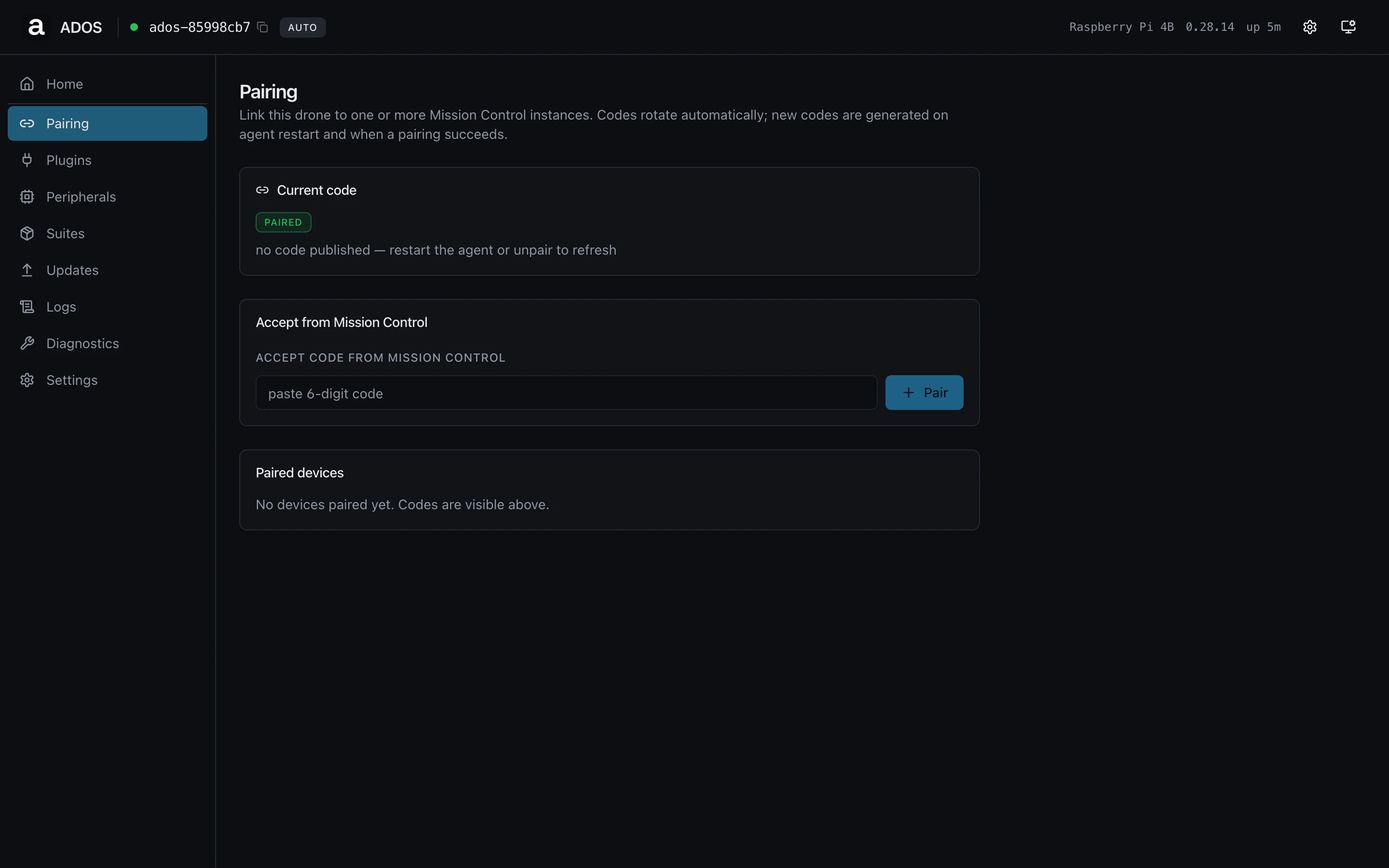
The Pairing page exposes the agent-to-Mission-Control pair flow on both
profiles. The page copy adapts to say "this drone" or "this ground
station" based on the active profile.
 ## Sections
### Current code
The six-character code currently published by the pairing beacon.
Rotates on agent restart and on every successful pair. A `paired` badge
shows when at least one Mission Control instance is paired; otherwise
it shows `awaiting pair`.
### Accept from Mission Control
Paste a code that Mission Control shows during its own pairing UI and
click **Pair**. Used when Mission Control initiates the pair instead of
the agent. The form clears after success.
### Paired devices
A list of every Mission Control client currently paired with this node.
Click **Unpair all** to revoke every key in one action; the next code
rotation completes after the revoke.
## Common operations
Copy the code shown under **Current code**, open Mission Control,
click "Pair a drone", paste the code, confirm.
Click **Unpair all** to revoke every key. The Cloud Relay tile on
Home flips back to `awaiting code` within a poll cycle.
## Backend endpoints
| Method | Path | Purpose |
| ------ | --------------------- | ---------------------------------- |
| GET | `/api/pairing/info` | Current state + paired clients |
| GET | `/api/pairing/code` | Fetch the active pairing code |
| POST | `/api/pairing/accept` | Accept a code from Mission Control |
| POST | `/api/pairing/unpair` | Revoke all paired clients |
## Troubleshooting
The node is already paired and not publishing a beacon. Unpair if you
want a fresh code, or open Mission Control's pair-existing flow and
type the device ID instead.
You tried to accept a code on an already-paired node. Unpair first or
add the new client through Mission Control's UI.
## Related
* [Pairing concept](/drone-agent/pairing)
* [Cloud relay](/drone-agent/cloud-relay)
## Sections
### Current code
The six-character code currently published by the pairing beacon.
Rotates on agent restart and on every successful pair. A `paired` badge
shows when at least one Mission Control instance is paired; otherwise
it shows `awaiting pair`.
### Accept from Mission Control
Paste a code that Mission Control shows during its own pairing UI and
click **Pair**. Used when Mission Control initiates the pair instead of
the agent. The form clears after success.
### Paired devices
A list of every Mission Control client currently paired with this node.
Click **Unpair all** to revoke every key in one action; the next code
rotation completes after the revoke.
## Common operations
Copy the code shown under **Current code**, open Mission Control,
click "Pair a drone", paste the code, confirm.
Click **Unpair all** to revoke every key. The Cloud Relay tile on
Home flips back to `awaiting code` within a poll cycle.
## Backend endpoints
| Method | Path | Purpose |
| ------ | --------------------- | ---------------------------------- |
| GET | `/api/pairing/info` | Current state + paired clients |
| GET | `/api/pairing/code` | Fetch the active pairing code |
| POST | `/api/pairing/accept` | Accept a code from Mission Control |
| POST | `/api/pairing/unpair` | Revoke all paired clients |
## Troubleshooting
The node is already paired and not publishing a beacon. Unpair if you
want a fresh code, or open Mission Control's pair-existing flow and
type the device ID instead.
You tried to accept a code on an already-paired node. Unpair first or
add the new client through Mission Control's UI.
## Related
* [Pairing concept](/drone-agent/pairing)
* [Cloud relay](/drone-agent/cloud-relay)