> ## Documentation Index
> Fetch the complete documentation index at: https://docs.altnautica.com/llms.txt
> Use this file to discover all available pages before exploring further.
# Video
> Live stream, encoder configuration, radio settings, latency probe, camera list.
# Video
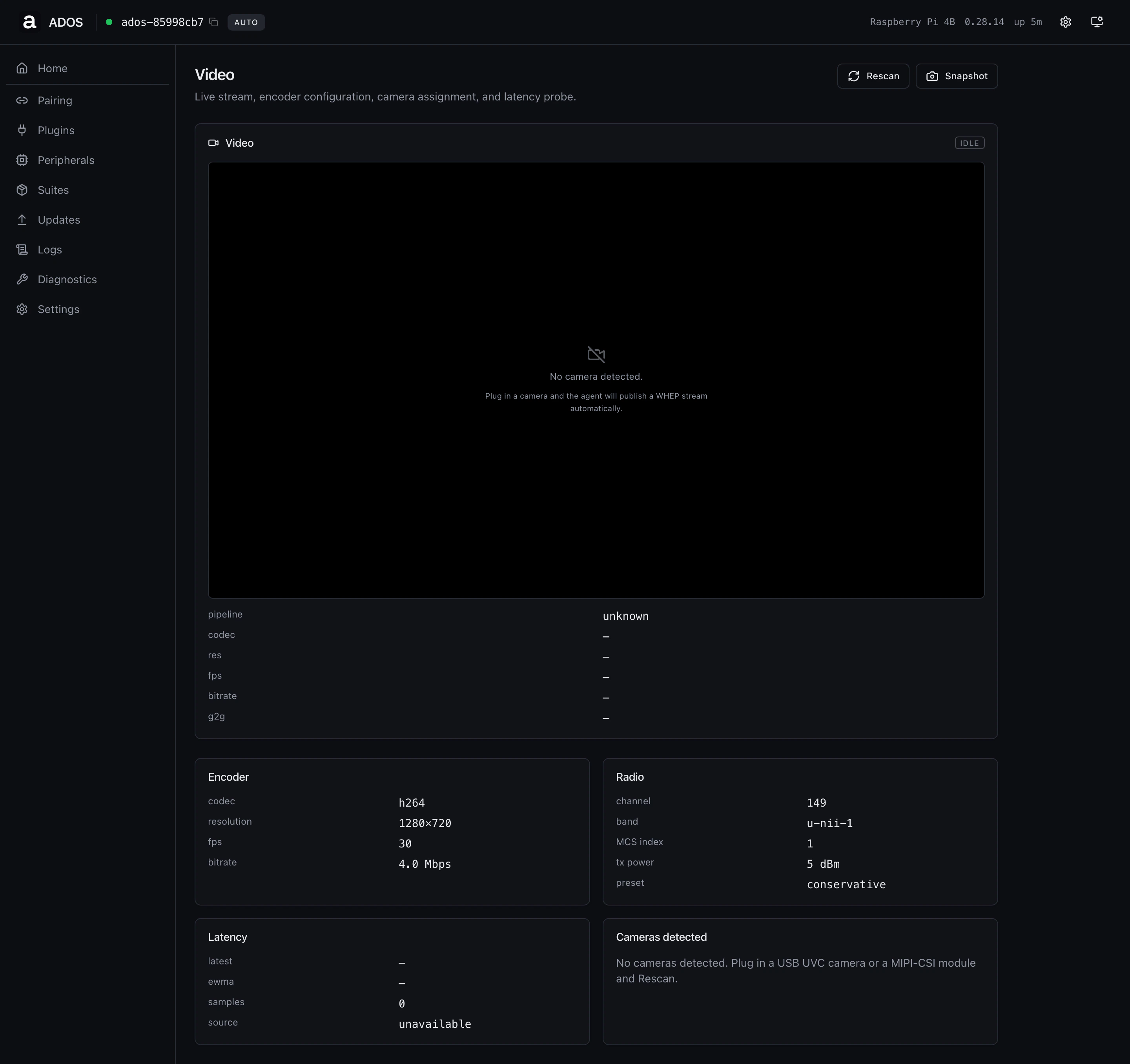
The Video page exposes the drone-side video pipeline. It reuses the
home page's video player and adds encoder, radio, latency, and camera
panels.
 ## Live player
WHEP first, HLS fallback, snapshot fallback. The player ships the same
state machine as the home panel: WebRTC handshake, HLS retry on
timeout, JPEG snapshot when both fail.
## Encoder
Codec, resolution, frame rate, bitrate. The values come from the
agent's video pipeline config and reflect what the encoder is actually
producing, not what you asked for if the encoder downgraded for
stability.
## Radio
Channel, band, MCS index, TX power, preset. Used by the WFB-ng air
side. Edits land via the air-pipeline endpoint and require a brief
pipeline restart to take effect.
## Latency
Glass-to-glass measurement when SEI-based timing is enabled. The
**latest** number is the most recent sample; **ewma** is the smoothed
average; **samples** is the depth of the rolling window. `source`
indicates whether the measurement comes from inserted SEI or pipeline
heuristics.
## Cameras detected
Every UVC and CSI device the agent enumerates. Plug a new camera and
the list refreshes on the next poll without a manual rescan.
## Common operations
Click **Snapshot**. The agent returns the latest decoded frame as a
JPEG, the browser downloads it.
Click **Rescan**. The agent re-enumerates `/dev/video*` and reports
any new devices.
## Profile gating
Video is a drone-only page. Ground stations get the WFB Receive page at
`/receive`.
## Backend endpoints
| Method | Path | Purpose |
| ------ | ---------------------------- | -------------------------------------- |
| GET | `/api/video` | Pipeline state, recorder, dependencies |
| GET | `/api/video/config` | Encoder + radio config |
| GET | `/api/video/cameras` | Camera enumeration |
| GET | `/api/video/latency` | Glass-to-glass measurement |
| GET | `/api/video/snapshot.jpg` | Latest frame JPEG |
| GET | `/api/v1/video/air-pipeline` | Air-side pipeline state |
## Troubleshooting
WHEP handshake is timing out. Check the Cloud Relay panel on Home: if
MQTT is not connected, WHEP cannot route. Otherwise the encoder may
have failed to start (see the Pipeline state line).
SEI timing is not enabled or the encoder does not emit SEI yet. Check
the encoder preset in **Settings → Advanced**.
## Related
* [Video pipeline](/drone-agent/video-pipeline)
* [WFB-ng configuration](/drone-agent/wfb-ng)
* [Cloud relay](/drone-agent/cloud-relay)
## Live player
WHEP first, HLS fallback, snapshot fallback. The player ships the same
state machine as the home panel: WebRTC handshake, HLS retry on
timeout, JPEG snapshot when both fail.
## Encoder
Codec, resolution, frame rate, bitrate. The values come from the
agent's video pipeline config and reflect what the encoder is actually
producing, not what you asked for if the encoder downgraded for
stability.
## Radio
Channel, band, MCS index, TX power, preset. Used by the WFB-ng air
side. Edits land via the air-pipeline endpoint and require a brief
pipeline restart to take effect.
## Latency
Glass-to-glass measurement when SEI-based timing is enabled. The
**latest** number is the most recent sample; **ewma** is the smoothed
average; **samples** is the depth of the rolling window. `source`
indicates whether the measurement comes from inserted SEI or pipeline
heuristics.
## Cameras detected
Every UVC and CSI device the agent enumerates. Plug a new camera and
the list refreshes on the next poll without a manual rescan.
## Common operations
Click **Snapshot**. The agent returns the latest decoded frame as a
JPEG, the browser downloads it.
Click **Rescan**. The agent re-enumerates `/dev/video*` and reports
any new devices.
## Profile gating
Video is a drone-only page. Ground stations get the WFB Receive page at
`/receive`.
## Backend endpoints
| Method | Path | Purpose |
| ------ | ---------------------------- | -------------------------------------- |
| GET | `/api/video` | Pipeline state, recorder, dependencies |
| GET | `/api/video/config` | Encoder + radio config |
| GET | `/api/video/cameras` | Camera enumeration |
| GET | `/api/video/latency` | Glass-to-glass measurement |
| GET | `/api/video/snapshot.jpg` | Latest frame JPEG |
| GET | `/api/v1/video/air-pipeline` | Air-side pipeline state |
## Troubleshooting
WHEP handshake is timing out. Check the Cloud Relay panel on Home: if
MQTT is not connected, WHEP cannot route. Otherwise the encoder may
have failed to start (see the Pipeline state line).
SEI timing is not enabled or the encoder does not emit SEI yet. Check
the encoder preset in **Settings → Advanced**.
## Related
* [Video pipeline](/drone-agent/video-pipeline)
* [WFB-ng configuration](/drone-agent/wfb-ng)
* [Cloud relay](/drone-agent/cloud-relay)