> ## Documentation Index
> Fetch the complete documentation index at: https://docs.altnautica.com/llms.txt
> Use this file to discover all available pages before exploring further.
# Build a mesh
> Bring up a receiver, pair relays to it, verify the mesh, and return a node to direct mode.
A mesh is one receiver plus one or more relays that share the job of receiving the drone. Set up each node as a single ground station first ([Set up a ground station](/ground-agent/setup)), then follow this page in order: the receiver, then each relay.
ADOS uses "pairing" for three separate things. A ground station normally needs the first two.
* **Mission Control pairing** gives one Mission Control owner an API key for the node. See [Pairing](/drone-agent/pairing).
* **Air-link pairing** (WFB-ng bind) exchanges radio keys between a drone and a ground station. See [WFB-ng pairing](/drone-agent/wfb-pairing).
* **Mesh pairing** joins a relay to a receiver in a ground mesh. See [Build a mesh](/ground-agent/mesh-setup#mesh-pairing).
## Mesh capability
A node takes the `relay` or `receiver` role only when it is **mesh-capable**: it carries two or more WFB-class radios (RTL8812EU or RTL8812AU, recognised by USB ID or driver). The agent checks the attached radios live on every role change and status read, so plugging in the second adapter is enough. Onboard Wi-Fi and adapters with other chipsets do not count.
The mesh dependencies (`batctl`, `wpasupplicant`) come with every ground-station install.
On a node that is not mesh-capable, a change to `relay` or `receiver` returns `409` with `E_MESH_NOT_CAPABLE`, and `GET /api/v1/ground-station/role` reports `"mesh_capable": false`. A change to `direct` is always allowed.
## Bring up a receiver
Do the receiver first. A relay pairs with a receiver, so it cannot join a mesh that has none.
A receiver needs no prior pairing. On its first start in the role it generates the mesh identity: the mesh id (`/etc/ados/mesh/id`) and a 32-byte shared key (`/etc/ados/mesh/psk.key`, mode `0600`).
Set the role from Mission Control (node panel, **Mesh & RX**), from the LCD **Mesh** page (tap **Switch role**, then tap **RECEIVER** twice), or over REST:
```bash theme={"theme":{"light":"github-light","dark":"github-dark"}}
curl -X PUT http://localhost:8080/api/v1/ground-station/role \
-H "Content-Type: application/json" \
-d '{"role": "receiver"}'
```
The transition stops the previous role's services, writes `receiver` to `/etc/ados/mesh/role`, clears stale mesh state, and starts the new services with `ados-batman` first, because the receive side binds to the mesh interface. The single-node receive unit, `ados-wfb-rx`, runs only in the `direct` role.
What then runs on the receiver:
| Unit | What it does |
| - | - |
| `ados-batman` | Joins the batman-adv mesh on the second adapter. |
| `ados-wfb-receiver` | Combines the local radio with relay forwards on UDP port `5800`. With `ground_station.wfb_receiver.accept_local_nic: true` (the default) it also reads its own adapter. |
| `ados-mediamtx-gs` | Serves the combined stream over WHEP, as on a single node. |
The receiver advertises `_ados-receiver._tcp` on `bat0`, so relays find it with no manual configuration.
### FEC combine
The Reed-Solomon FEC combine runs at the receiver. With the radio defaults of 8 data fragments in a block of 12, the receiver rebuilds a block from any 8 of the 12 fragments, whichever radio heard them.
```bash theme={"theme":{"light":"github-light","dark":"github-dark"}}
curl http://localhost:8080/api/v1/ground-station/wfb/receiver/combined
curl http://localhost:8080/api/v1/ground-station/wfb/receiver/relays
```
### Cloud uplink election
Any mesh node with a working uplink (Ethernet, Wi-Fi client or a cellular modem) can advertise itself as the mesh's cloud gateway. The receiver picks the best one by batman-adv link quality and routes cloud traffic through it, and moves to the next one when a gateway drops. To pin a gateway, see [Local mesh (batman-adv)](/ground-agent/batman-adv#cloud-gateway-election).
## Mesh pairing
A relay learns which receiver to forward to, the mesh id and the shared key during mesh pairing. Pairing is local: no cloud service is involved.
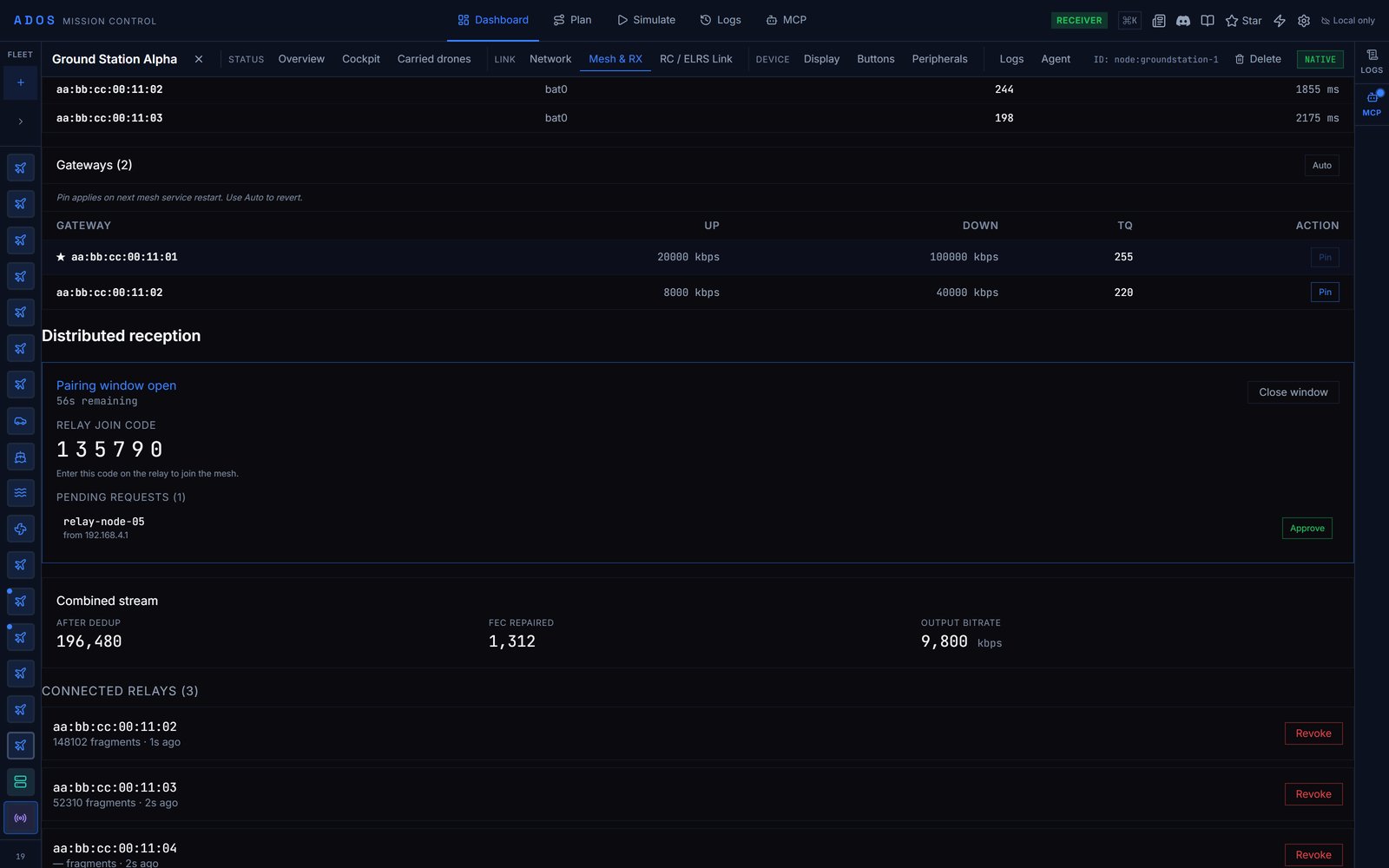 In Mission Control, open the receiver's node panel, **Mesh & RX**, and open the accept window. The window lasts 60 seconds by default and shows a six-digit join code. Over REST:
```bash theme={"theme":{"light":"github-light","dark":"github-dark"}}
curl -X POST http://localhost:8080/api/v1/ground-station/pair/accept \
-H "Content-Type: application/json" \
-d '{"duration_s": 60}'
```
`duration_s` accepts 5 to 300. Only a receiver can open the window; another role gets `409 E_WRONG_ROLE`.
The relay must be in the `direct` or `relay` role. Join from its node panel in Mission Control, or over REST:
```bash theme={"theme":{"light":"github-light","dark":"github-dark"}}
curl -X POST http://localhost:8080/api/v1/ground-station/pair/join \
-H "Content-Type: application/json" \
-d '{"code": "482910"}'
```
The relay's device id appears in the pending list (Mission Control, or `GET /api/v1/ground-station/pair/pending`). Approve it:
```bash theme={"theme":{"light":"github-light","dark":"github-dark"}}
curl -X POST http://localhost:8080/api/v1/ground-station/pair/approve/
```
The relay decrypts the invite with its one-time key and the join code, and writes `/etc/ados/mesh/id`, `/etc/ados/mesh/psk.key` (mode `0600`), `/etc/ados/mesh/receiver.json` and the drone receive key. It also keeps its join key, the join code and its join port in `/etc/ados/mesh/relay-rekey.json` (mode `0600`), so it can open a re-keyed bundle later.
Close the window early with `POST /api/v1/ground-station/pair/close`.
Pairing does not change the relay's role. Continue with [Add a relay](#add-a-relay).
### Pairing protocol
| Element | Value |
| - | - |
| Transport | UDP port `5801` on the mesh interface `bat0` |
| Request | One JSON datagram |
| Reply | One encrypted blob |
| Key exchange | X25519 |
| Cipher | ChaCha20-Poly1305, key derived from the X25519 secret and the join code |
| Join code | Six digits, new for every accept window |
| Accept window | 60 seconds by default, 5 to 300 |
| Invite lifetime | 120 seconds from issue |
| mDNS service | `_ados-receiver._tcp`, receiver port `5800` |
The request is `{"type": "join", "device_id": "", "pubkey_hex": "<32 bytes hex>"}`. The join code never goes on the wire. The relay generates a fresh key pair for every attempt. The key pair of the attempt that succeeds is kept for re-keying (see revocation below); the others are discarded.
The reply is 32 bytes of the receiver's one-time public key, a 12-byte nonce, then the ciphertext and its 16-byte tag. The plaintext carries the mesh id, the shared key, the drone channel, the drone receive key, the receiver's mDNS host and port, and `issued_at_ms` plus `expires_at_ms`.
The receiver sends the reply twice, 100 ms apart, because a single lost datagram on a lossy mesh should not force a retry. The relay keeps the first copy that opens. A relay resolves the receiver over mDNS and falls back to a broadcast on `bat0`; it takes replies only from the receiver it resolved. After five replies that do not open under the code, the join stops with `E_INVITE_REJECTED`: check the code and join again.
### Security model
The threat model is an operator with physical access to both nodes for one minute. Capture-and-replay against past pairings and side channels are out of scope. In scope:
* **Receiver authentication through the join code.** Any node that overhears a broadcast join request learns the relay's public key, but the session key also binds the six-digit code shown on the receiver, so only that receiver can seal an invite that opens.
* **Confidentiality.** The reply opens only with the relay's one-time private key, so a passive listener on the same mesh cannot read it.
* **Authenticated encryption.** ChaCha20-Poly1305 detects any tampering.
* **Invite expiry.** 120 seconds; a replayed invite is rejected.
* **Revocation.** Revoke a relay from its card in the receiver's **Mesh & RX** tab in Mission Control, or over REST on the receiver:
```bash theme={"theme":{"light":"github-light","dark":"github-dark"}}
curl -X POST http://localhost:8080/api/v1/ground-station/pair/revoke/
```
Revoked ids persist in `/etc/ados/mesh/revocations.json` (mode `0600`), and a later join from that device is dropped before it reaches the pending list. A new revocation also rotates the mesh id and shared key, re-seals the new bundle to every relay that is still paired (to the key and join code each relay joined with, sent twice to its join port), and restarts `ados-batman`. Each remaining relay listens on its join port, applies a bundle that opens and is newer than the one it holds, and restarts its own `ados-batman`. The revoked relay's copy of the key stops working.
## Add a relay
After mesh pairing, change the relay's role. Changing to `relay` before pairing returns `409 E_NOT_PAIRED`, because the mesh service has no mesh id or key to join with.
```bash theme={"theme":{"light":"github-light","dark":"github-dark"}}
curl -X PUT http://localhost:8080/api/v1/ground-station/role \
-H "Content-Type: application/json" \
-d '{"role": "relay"}'
```
The same change is available from Mission Control (**Mesh & RX**) or the LCD **Mesh** page. The relay's services start with `ados-batman` first, then `ados-wfb-relay`.
A relay forwards what it hears rather than decoding it, so the combined stream lives on the receiver. Point Mission Control and browsers at the receiver for video.
## Verify the mesh
On the relay:
```bash theme={"theme":{"light":"github-light","dark":"github-dark"}}
curl http://localhost:8080/api/v1/ground-station/wfb/relay/status
```
Expect `receiver_ip`, `receiver_port`, `fragments_seen`, `fragments_forwarded` and `up: true`. If `up` stays false, the relay has not found the receiver over mDNS: check that the receiver is up and both nodes see each other (`sudo batctl n`).
| Surface | What to look at |
| - | - |
| OLED | The fourth line reads `role: relay` or `role: receiver`. |
| LCD | The **Mesh** page shows the role, a peer list and the selected gateway. |
| Mission Control | **Mesh & RX** shows each paired relay with its fragment counts, the combined stream and the mesh neighbours. |
| REST | `/api/v1/ground-station/role`, `/api/v1/ground-station/mesh`, `/api/v1/ground-station/wfb/relay/status`, `/api/v1/ground-station/wfb/receiver/relays`, `/api/v1/ground-station/wfb/receiver/combined` |
| CLI | `ados diag link` and `ados diag video` |
## Go back to direct
Set the role to `direct` from Mission Control, the LCD **Mesh** page, or REST:
```bash theme={"theme":{"light":"github-light","dark":"github-dark"}}
curl -X PUT http://localhost:8080/api/v1/ground-station/role \
-H "Content-Type: application/json" \
-d '{"role": "direct"}'
```
The transition stops the mesh services, writes `direct` to `/etc/ados/mesh/role`, clears the mesh runtime snapshots, and brings `ados-wfb-rx` back up.
The mesh identity stays on disk, so a later switch back to `relay` resumes without pairing again. A [factory reset](/ground-agent/setup#factory-reset) wipes it.
## Next steps
The mesh carrier and gateway election.
When relays do not pair or the mesh does not form.
This documentation is built and hosted on [Mintlify](https://mintlify.com), a developer documentation platform.
In Mission Control, open the receiver's node panel, **Mesh & RX**, and open the accept window. The window lasts 60 seconds by default and shows a six-digit join code. Over REST:
```bash theme={"theme":{"light":"github-light","dark":"github-dark"}}
curl -X POST http://localhost:8080/api/v1/ground-station/pair/accept \
-H "Content-Type: application/json" \
-d '{"duration_s": 60}'
```
`duration_s` accepts 5 to 300. Only a receiver can open the window; another role gets `409 E_WRONG_ROLE`.
The relay must be in the `direct` or `relay` role. Join from its node panel in Mission Control, or over REST:
```bash theme={"theme":{"light":"github-light","dark":"github-dark"}}
curl -X POST http://localhost:8080/api/v1/ground-station/pair/join \
-H "Content-Type: application/json" \
-d '{"code": "482910"}'
```
The relay's device id appears in the pending list (Mission Control, or `GET /api/v1/ground-station/pair/pending`). Approve it:
```bash theme={"theme":{"light":"github-light","dark":"github-dark"}}
curl -X POST http://localhost:8080/api/v1/ground-station/pair/approve/
```
The relay decrypts the invite with its one-time key and the join code, and writes `/etc/ados/mesh/id`, `/etc/ados/mesh/psk.key` (mode `0600`), `/etc/ados/mesh/receiver.json` and the drone receive key. It also keeps its join key, the join code and its join port in `/etc/ados/mesh/relay-rekey.json` (mode `0600`), so it can open a re-keyed bundle later.
Close the window early with `POST /api/v1/ground-station/pair/close`.
Pairing does not change the relay's role. Continue with [Add a relay](#add-a-relay).
### Pairing protocol
| Element | Value |
| - | - |
| Transport | UDP port `5801` on the mesh interface `bat0` |
| Request | One JSON datagram |
| Reply | One encrypted blob |
| Key exchange | X25519 |
| Cipher | ChaCha20-Poly1305, key derived from the X25519 secret and the join code |
| Join code | Six digits, new for every accept window |
| Accept window | 60 seconds by default, 5 to 300 |
| Invite lifetime | 120 seconds from issue |
| mDNS service | `_ados-receiver._tcp`, receiver port `5800` |
The request is `{"type": "join", "device_id": "", "pubkey_hex": "<32 bytes hex>"}`. The join code never goes on the wire. The relay generates a fresh key pair for every attempt. The key pair of the attempt that succeeds is kept for re-keying (see revocation below); the others are discarded.
The reply is 32 bytes of the receiver's one-time public key, a 12-byte nonce, then the ciphertext and its 16-byte tag. The plaintext carries the mesh id, the shared key, the drone channel, the drone receive key, the receiver's mDNS host and port, and `issued_at_ms` plus `expires_at_ms`.
The receiver sends the reply twice, 100 ms apart, because a single lost datagram on a lossy mesh should not force a retry. The relay keeps the first copy that opens. A relay resolves the receiver over mDNS and falls back to a broadcast on `bat0`; it takes replies only from the receiver it resolved. After five replies that do not open under the code, the join stops with `E_INVITE_REJECTED`: check the code and join again.
### Security model
The threat model is an operator with physical access to both nodes for one minute. Capture-and-replay against past pairings and side channels are out of scope. In scope:
* **Receiver authentication through the join code.** Any node that overhears a broadcast join request learns the relay's public key, but the session key also binds the six-digit code shown on the receiver, so only that receiver can seal an invite that opens.
* **Confidentiality.** The reply opens only with the relay's one-time private key, so a passive listener on the same mesh cannot read it.
* **Authenticated encryption.** ChaCha20-Poly1305 detects any tampering.
* **Invite expiry.** 120 seconds; a replayed invite is rejected.
* **Revocation.** Revoke a relay from its card in the receiver's **Mesh & RX** tab in Mission Control, or over REST on the receiver:
```bash theme={"theme":{"light":"github-light","dark":"github-dark"}}
curl -X POST http://localhost:8080/api/v1/ground-station/pair/revoke/
```
Revoked ids persist in `/etc/ados/mesh/revocations.json` (mode `0600`), and a later join from that device is dropped before it reaches the pending list. A new revocation also rotates the mesh id and shared key, re-seals the new bundle to every relay that is still paired (to the key and join code each relay joined with, sent twice to its join port), and restarts `ados-batman`. Each remaining relay listens on its join port, applies a bundle that opens and is newer than the one it holds, and restarts its own `ados-batman`. The revoked relay's copy of the key stops working.
## Add a relay
After mesh pairing, change the relay's role. Changing to `relay` before pairing returns `409 E_NOT_PAIRED`, because the mesh service has no mesh id or key to join with.
```bash theme={"theme":{"light":"github-light","dark":"github-dark"}}
curl -X PUT http://localhost:8080/api/v1/ground-station/role \
-H "Content-Type: application/json" \
-d '{"role": "relay"}'
```
The same change is available from Mission Control (**Mesh & RX**) or the LCD **Mesh** page. The relay's services start with `ados-batman` first, then `ados-wfb-relay`.
A relay forwards what it hears rather than decoding it, so the combined stream lives on the receiver. Point Mission Control and browsers at the receiver for video.
## Verify the mesh
On the relay:
```bash theme={"theme":{"light":"github-light","dark":"github-dark"}}
curl http://localhost:8080/api/v1/ground-station/wfb/relay/status
```
Expect `receiver_ip`, `receiver_port`, `fragments_seen`, `fragments_forwarded` and `up: true`. If `up` stays false, the relay has not found the receiver over mDNS: check that the receiver is up and both nodes see each other (`sudo batctl n`).
| Surface | What to look at |
| - | - |
| OLED | The fourth line reads `role: relay` or `role: receiver`. |
| LCD | The **Mesh** page shows the role, a peer list and the selected gateway. |
| Mission Control | **Mesh & RX** shows each paired relay with its fragment counts, the combined stream and the mesh neighbours. |
| REST | `/api/v1/ground-station/role`, `/api/v1/ground-station/mesh`, `/api/v1/ground-station/wfb/relay/status`, `/api/v1/ground-station/wfb/receiver/relays`, `/api/v1/ground-station/wfb/receiver/combined` |
| CLI | `ados diag link` and `ados diag video` |
## Go back to direct
Set the role to `direct` from Mission Control, the LCD **Mesh** page, or REST:
```bash theme={"theme":{"light":"github-light","dark":"github-dark"}}
curl -X PUT http://localhost:8080/api/v1/ground-station/role \
-H "Content-Type: application/json" \
-d '{"role": "direct"}'
```
The transition stops the mesh services, writes `direct` to `/etc/ados/mesh/role`, clears the mesh runtime snapshots, and brings `ados-wfb-rx` back up.
The mesh identity stays on disk, so a later switch back to `relay` resumes without pairing again. A [factory reset](/ground-agent/setup#factory-reset) wipes it.
## Next steps
The mesh carrier and gateway election.
When relays do not pair or the mesh does not form.
This documentation is built and hosted on [Mintlify](https://mintlify.com), a developer documentation platform.