> ## Documentation Index
> Fetch the complete documentation index at: https://docs.altnautica.com/llms.txt
> Use this file to discover all available pages before exploring further.
# Ground station node panel
> Manage a Ground Agent node from Mission Control: status, radio, network, Mesh & RX, ELRS link, display, buttons, peripherals and logs.
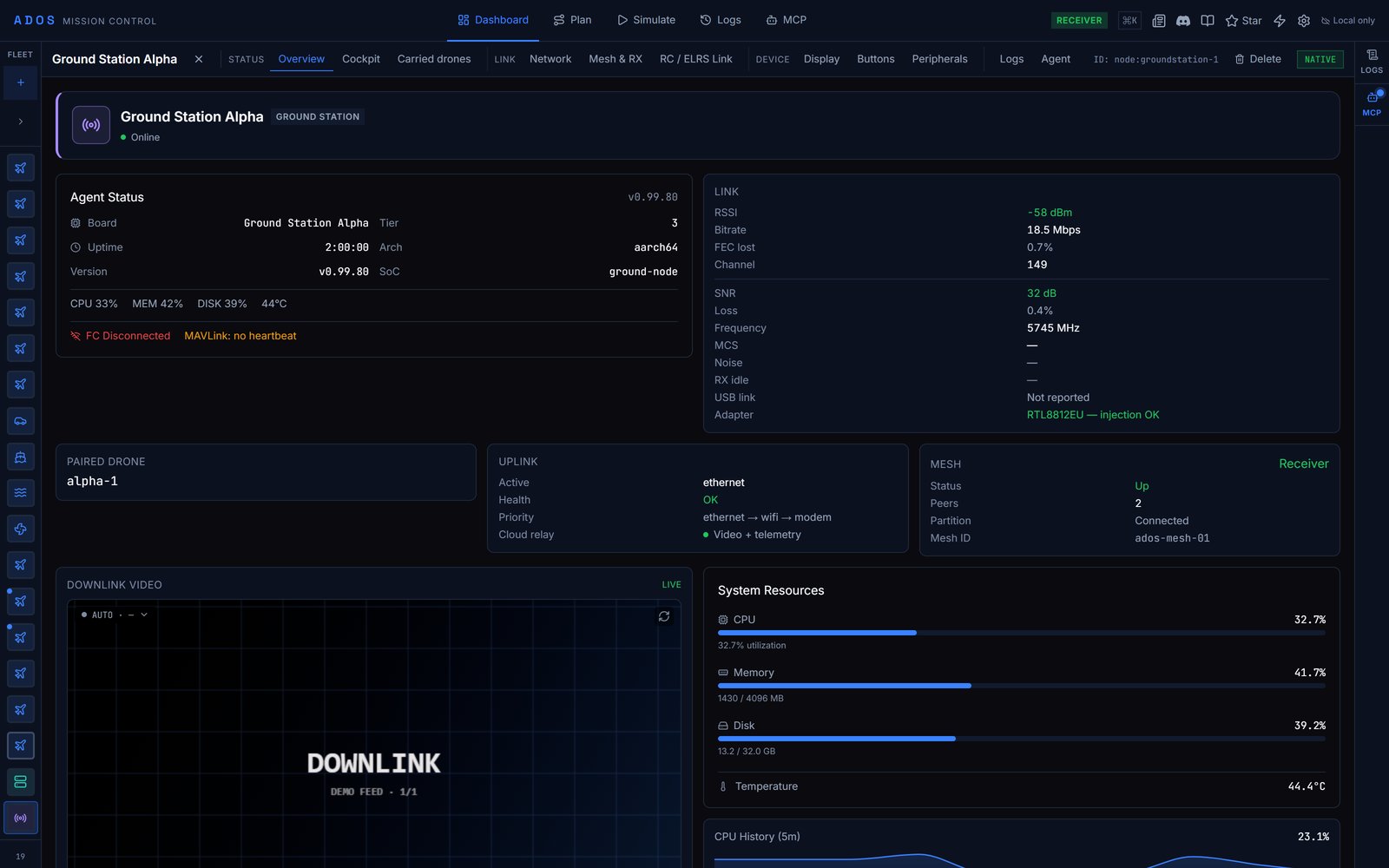
A node running the Ground Agent (`ground_station` profile) gets its own detail panel in Mission Control. Select the ground station in the Fleet sidebar to open it.
 ## Tabs
| Group | Tab | Shown |
| - | - | - |
| Status | **Overview** | Always |
| | **Cockpit** | Always |
| | **Carried drones** | Always |
| Link | **Radio** | Not in the `receiver` role, which does not transmit |
| | **Network** | Always |
| | **Mesh & RX** | Always. It holds the role picker. |
| | **RC / ELRS Link** | Only when an ExpressLRS CRSF link is present |
| Device | **Display** | Always |
| | **Buttons** | Always |
| | **Peripherals** | Always |
| No group | **Logs** | Always |
| No group | **Agent** | Always |
The top bar also shows the ground station's role (**Direct**, **Relay**, **Receiver** or **Unset**).
### Overview
Status at a glance: the Agent Status card (CPU, memory, disk, temperature and control-plane round-trip time), link health, the paired drone, the uplink, the mesh summary, the video card, resource gauges, the service table and a log viewer.
### Cockpit
Hands over to the drone this ground station carries: **This ground station carries {name}** with a **Fly {name}** button. With no drone linked, it points to **Carried drones**. See [Cockpit and Skills](/mission-control/cockpit).
### Carried drones
The aircraft this ground station relays, when each was last heard, and what authority this browser holds over it. "Last heard" is a decode on the ground station, not a heartbeat from the drone's own uplink. See [Transitive enrollment](/ground-agent/transitive-enrollment).
### Radio
The WFB-ng video radio: link state, channel and TX power, the video link, and **Phone receivers** for phones receiving the air link directly. See [WFB-ng](/drone-agent/wfb-ng).
### Network
Every uplink path: Wi-Fi access point, Wi-Fi client, Ethernet and 4G modem, plus uplink priority, adapter stability and Wi-Fi power save. The active uplink decides which network the agent uses for the cloud relay. **Pair with drone** starts air-link pairing. See [Uplink matrix](/ground-agent/uplink-matrix).
### Mesh & RX
## Tabs
| Group | Tab | Shown |
| - | - | - |
| Status | **Overview** | Always |
| | **Cockpit** | Always |
| | **Carried drones** | Always |
| Link | **Radio** | Not in the `receiver` role, which does not transmit |
| | **Network** | Always |
| | **Mesh & RX** | Always. It holds the role picker. |
| | **RC / ELRS Link** | Only when an ExpressLRS CRSF link is present |
| Device | **Display** | Always |
| | **Buttons** | Always |
| | **Peripherals** | Always |
| No group | **Logs** | Always |
| No group | **Agent** | Always |
The top bar also shows the ground station's role (**Direct**, **Relay**, **Receiver** or **Unset**).
### Overview
Status at a glance: the Agent Status card (CPU, memory, disk, temperature and control-plane round-trip time), link health, the paired drone, the uplink, the mesh summary, the video card, resource gauges, the service table and a log viewer.
### Cockpit
Hands over to the drone this ground station carries: **This ground station carries {name}** with a **Fly {name}** button. With no drone linked, it points to **Carried drones**. See [Cockpit and Skills](/mission-control/cockpit).
### Carried drones
The aircraft this ground station relays, when each was last heard, and what authority this browser holds over it. "Last heard" is a decode on the ground station, not a heartbeat from the drone's own uplink. See [Transitive enrollment](/ground-agent/transitive-enrollment).
### Radio
The WFB-ng video radio: link state, channel and TX power, the video link, and **Phone receivers** for phones receiving the air link directly. See [WFB-ng](/drone-agent/wfb-ng).
### Network
Every uplink path: Wi-Fi access point, Wi-Fi client, Ethernet and 4G modem, plus uplink priority, adapter stability and Wi-Fi power save. The active uplink decides which network the agent uses for the cloud relay. **Pair with drone** starts air-link pairing. See [Uplink matrix](/ground-agent/uplink-matrix).
### Mesh & RX
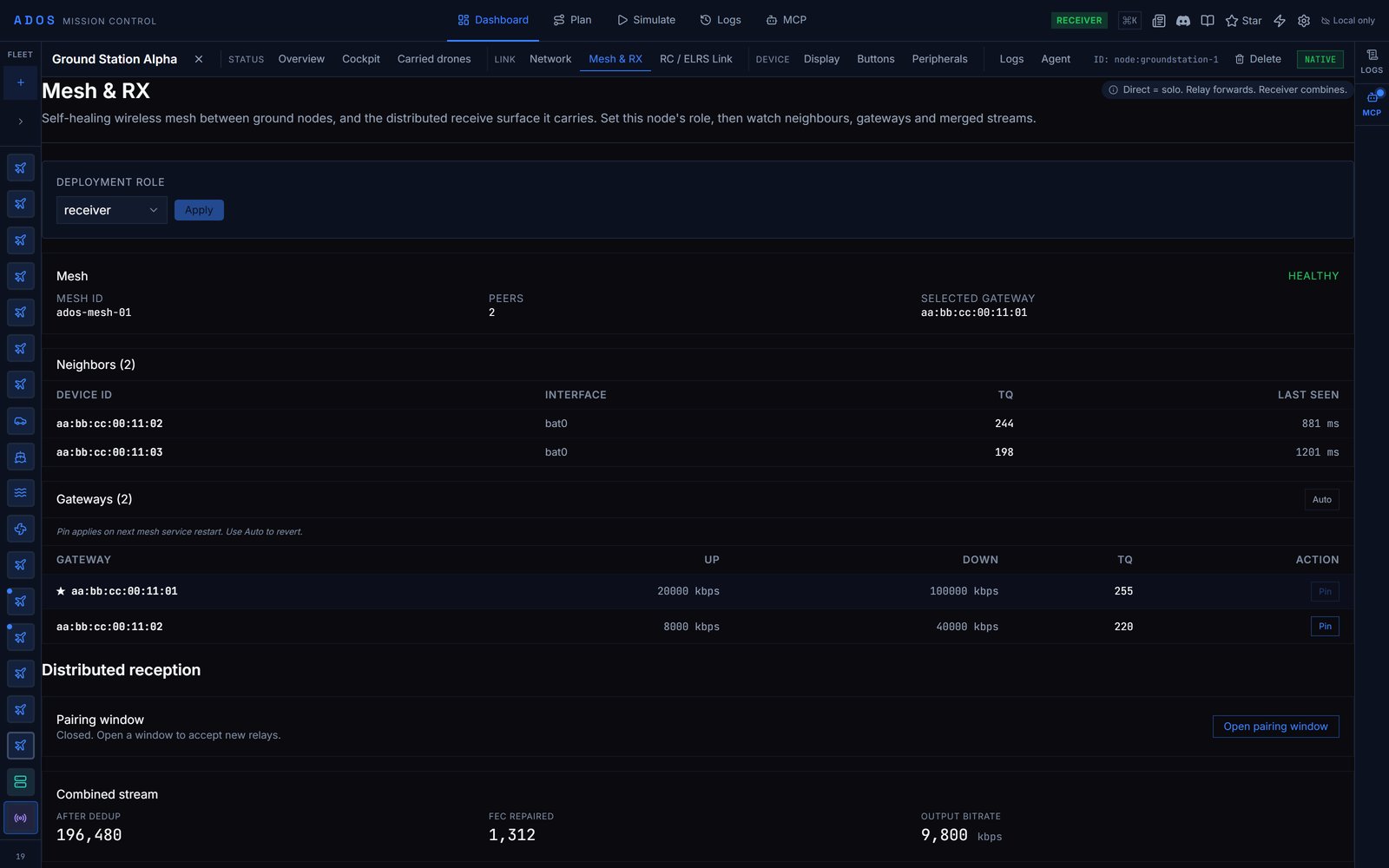 The mesh between ground stations and the distributed receive it carries. **Direct** works alone, **Relay** forwards, **Receiver** combines.
* **Deployment role**: pick `direct`, `relay` or `receiver` and click **Apply**. The role is written to the node over the LAN. On a direct node, the tab says so and the rest stays empty.
* **Mesh health**, **neighbours** and **gateways**, on relay and receiver nodes.
* **Relay status** on a relay.
* **Distributed reception** on a receiver: the pairing window (**Open pairing window**, **Close window**, the seconds remaining), the **Relay join code** to enter on a relay, **Pending requests** with **Approve**, combined-stream statistics and **Connected relays**.
See [Build a mesh](/ground-agent/mesh-setup).
### RC / ELRS Link
The ExpressLRS control lane this node transmits: RSSI, SNR, uplink and downlink LQ, band, packet rate, TX power, frame counts, control mode, channel source, pilot in command and relay role. See [ELRS CRSF control lane](/ground-agent/elrs-crsf-control-lane).
### Display
The SPI LCD on the ground station: **Local Display** (auto-detect or force HDMI, LCD or none), a **Live preview** of the LCD, **HDMI Cockpit** with its kiosk URL, **Remote control**, theme, camera switch and recording monitor. **Calibrate touch** runs the nine-point touch calibration on the device; tap each crosshair it shows. See [Front panel](/ground-agent/display).
### Buttons
The mesh between ground stations and the distributed receive it carries. **Direct** works alone, **Relay** forwards, **Receiver** combines.
* **Deployment role**: pick `direct`, `relay` or `receiver` and click **Apply**. The role is written to the node over the LAN. On a direct node, the tab says so and the rest stays empty.
* **Mesh health**, **neighbours** and **gateways**, on relay and receiver nodes.
* **Relay status** on a relay.
* **Distributed reception** on a receiver: the pairing window (**Open pairing window**, **Close window**, the seconds remaining), the **Relay join code** to enter on a relay, **Pending requests** with **Approve**, combined-stream statistics and **Connected relays**.
See [Build a mesh](/ground-agent/mesh-setup).
### RC / ELRS Link
The ExpressLRS control lane this node transmits: RSSI, SNR, uplink and downlink LQ, band, packet rate, TX power, frame counts, control mode, channel source, pilot in command and relay role. See [ELRS CRSF control lane](/ground-agent/elrs-crsf-control-lane).
### Display
The SPI LCD on the ground station: **Local Display** (auto-detect or force HDMI, LCD or none), a **Live preview** of the LCD, **HDMI Cockpit** with its kiosk URL, **Remote control**, theme, camera switch and recording monitor. **Calibrate touch** runs the nine-point touch calibration on the device; tap each crosshair it shows. See [Front panel](/ground-agent/display).
### Buttons
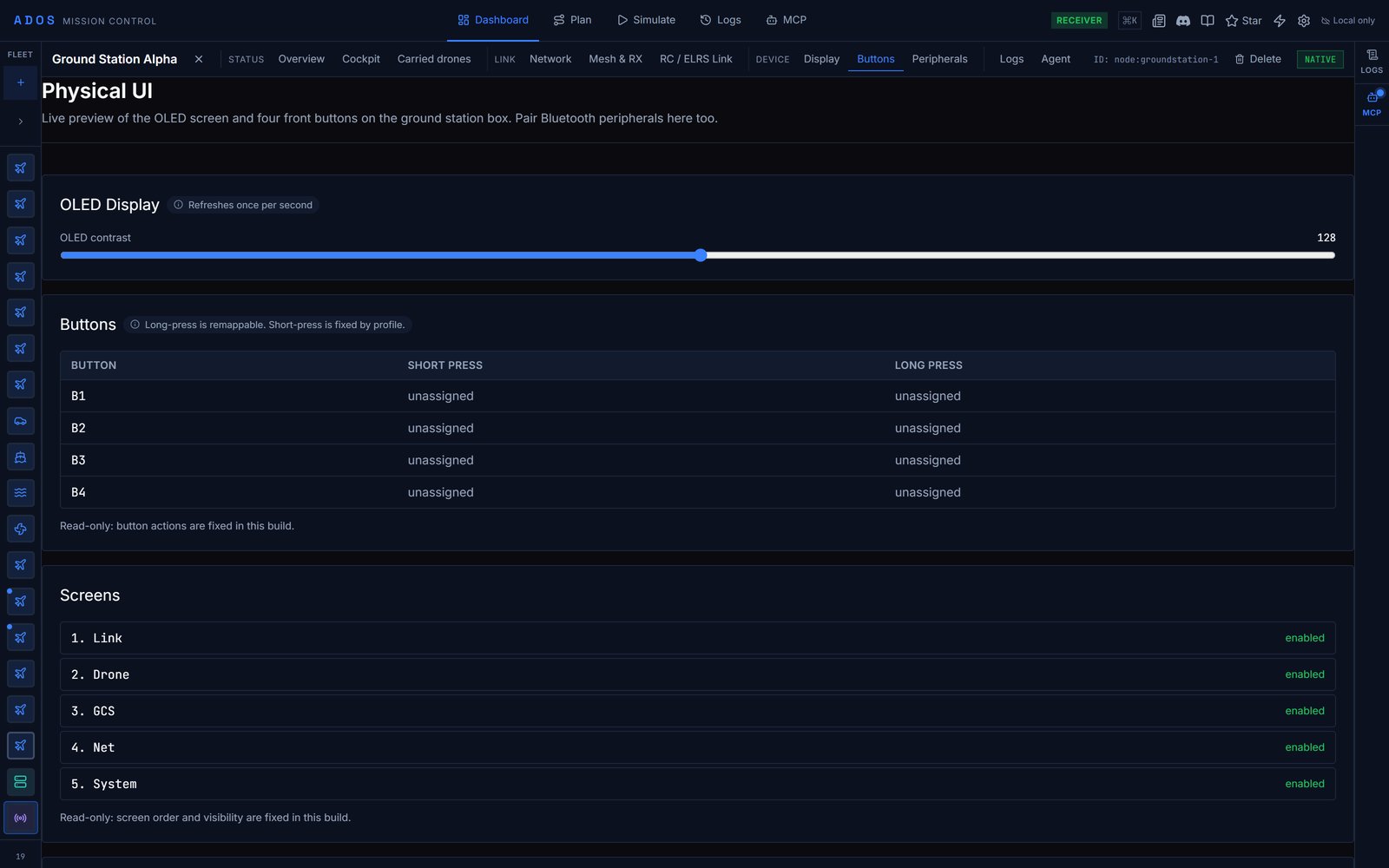 The front panel and Bluetooth accessories (page title **Physical UI**):
* The local display card and LCD preview, shown only when the agent has an SPI LCD panel bound.
* **OLED Display**: the **OLED contrast** slider (0 to 255). Changes are sent to the node and applied to the OLED.
* **Buttons**: what B1 to B4 do on a short and a long press. Read-only in Mission Control; remap long presses through the agent API described on [Front panel](/ground-agent/display).
* **Screens**: the OLED screen order. Read-only.
* **Bluetooth**: **Pair new device** to scan and pair a gamepad or accessory, and **Forget** for each paired device.
### Peripherals
Extension-managed peripherals the agent declares: cameras, sensors and custom hardware, with a rescan button.
### Logs and Agent
**Logs** shows the node's logs (a ground station has no flights). **Agent** is the configuration sidebar described on [Node configuration](/mission-control/node-configuration).
## Factory reset
Mission Control does not factory-reset a ground station. The reset runs on the box itself. The procedure is on [Set up a ground station](/ground-agent/setup#re-run-setup-and-reset), and what it wipes is listed on [Hardening](/operations/hardening).
## Data flow
The panel talks to the Ground Agent over:
| Channel | Path |
| - | - |
| REST API | `http://:8080/api/v1/ground-station/*` |
| Uplink events | `ws://:8080/api/v1/ground-station/ws/uplink` |
| Mesh events | `ws://:8080/api/v1/ground-station/ws/mesh` |
| Button events | `ws://:8080/api/v1/ground-station/ws/buttons` |
| PIC events | `ws://:8080/api/v1/ground-station/pic/events` |
On the ground station's own access point the node is `192.168.4.1`, and over USB tether `192.168.7.1`. A Mission Control page served over HTTPS (including the hosted version) cannot open these plain `http://` and `ws://` endpoints. Use Mission Control from source over plain HTTP, the desktop app, or the ground station's own dashboard at `http://192.168.4.1:8080/`.
Polling pauses while the browser tab is hidden. When a node goes offline the panel keeps its last-known state and refreshes on reconnect. None of the local controls need the internet.
## Next steps
Install, pick a role and pair.
Relays, receivers and mesh pairing.
OLED, buttons and the touch display.
This documentation is built and hosted on [Mintlify](https://mintlify.com), a developer documentation platform.
The front panel and Bluetooth accessories (page title **Physical UI**):
* The local display card and LCD preview, shown only when the agent has an SPI LCD panel bound.
* **OLED Display**: the **OLED contrast** slider (0 to 255). Changes are sent to the node and applied to the OLED.
* **Buttons**: what B1 to B4 do on a short and a long press. Read-only in Mission Control; remap long presses through the agent API described on [Front panel](/ground-agent/display).
* **Screens**: the OLED screen order. Read-only.
* **Bluetooth**: **Pair new device** to scan and pair a gamepad or accessory, and **Forget** for each paired device.
### Peripherals
Extension-managed peripherals the agent declares: cameras, sensors and custom hardware, with a rescan button.
### Logs and Agent
**Logs** shows the node's logs (a ground station has no flights). **Agent** is the configuration sidebar described on [Node configuration](/mission-control/node-configuration).
## Factory reset
Mission Control does not factory-reset a ground station. The reset runs on the box itself. The procedure is on [Set up a ground station](/ground-agent/setup#re-run-setup-and-reset), and what it wipes is listed on [Hardening](/operations/hardening).
## Data flow
The panel talks to the Ground Agent over:
| Channel | Path |
| - | - |
| REST API | `http://:8080/api/v1/ground-station/*` |
| Uplink events | `ws://:8080/api/v1/ground-station/ws/uplink` |
| Mesh events | `ws://:8080/api/v1/ground-station/ws/mesh` |
| Button events | `ws://:8080/api/v1/ground-station/ws/buttons` |
| PIC events | `ws://:8080/api/v1/ground-station/pic/events` |
On the ground station's own access point the node is `192.168.4.1`, and over USB tether `192.168.7.1`. A Mission Control page served over HTTPS (including the hosted version) cannot open these plain `http://` and `ws://` endpoints. Use Mission Control from source over plain HTTP, the desktop app, or the ground station's own dashboard at `http://192.168.4.1:8080/`.
Polling pauses while the browser tab is hidden. When a node goes offline the panel keeps its last-known state and refreshes on reconnect. None of the local controls need the internet.
## Next steps
Install, pick a role and pair.
Relays, receivers and mesh pairing.
OLED, buttons and the touch display.
This documentation is built and hosted on [Mintlify](https://mintlify.com), a developer documentation platform.