> ## Documentation Index
> Fetch the complete documentation index at: https://docs.altnautica.com/llms.txt
> Use this file to discover all available pages before exploring further.
# What is ADOS Mission Control?
> A browser-based ground control station for ArduPilot, PX4, Betaflight, and iNav drones.
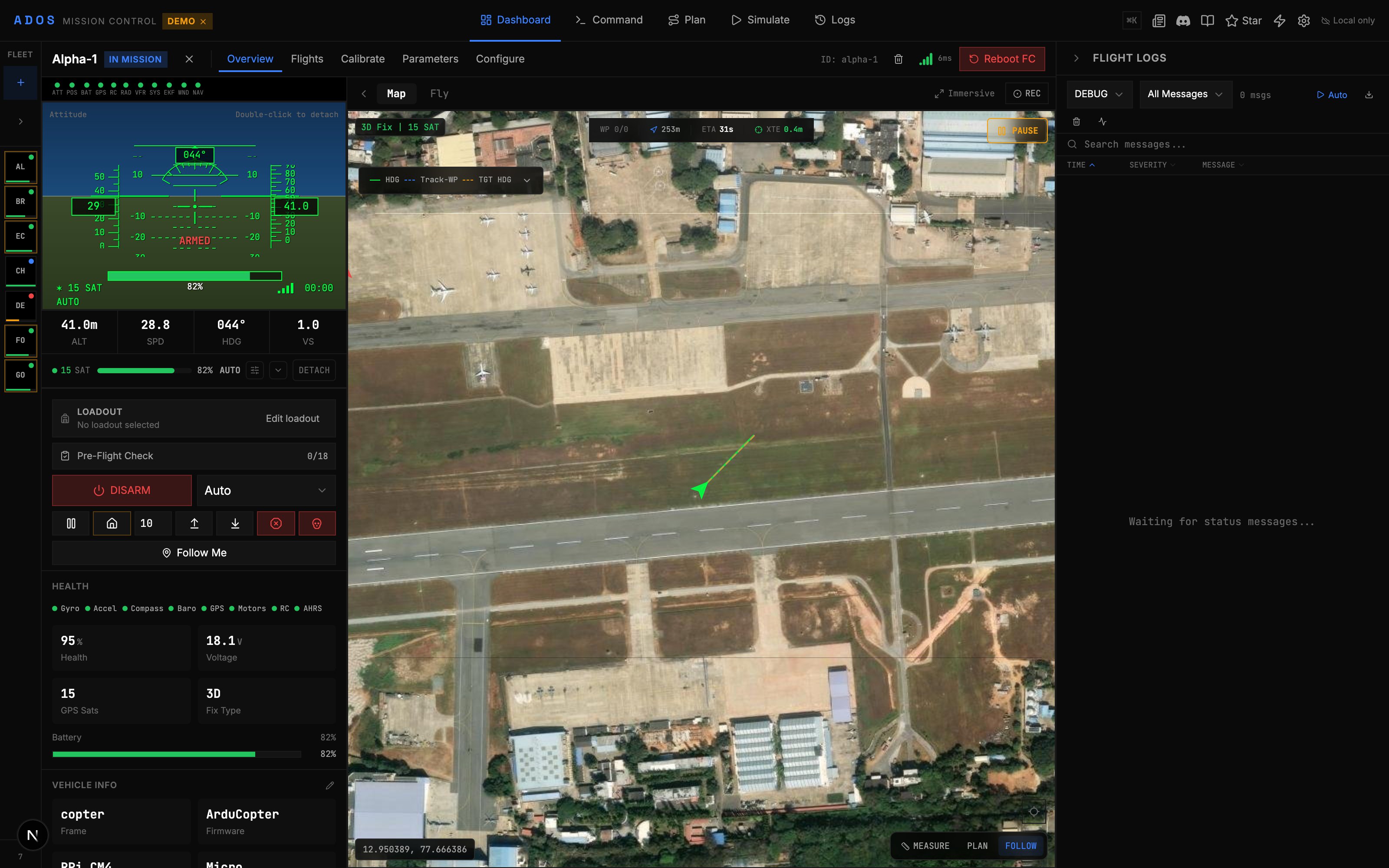
ADOS Mission Control is an open-source ground control station (GCS) that runs in your browser. It connects to your flight controller over USB, Wi-Fi, or the cloud, and gives you everything you need to fly, plan missions, configure your FC, and manage a fleet.
 ## Why Mission Control?
Traditional GCS tools are desktop-only, platform-locked, and built for a single firmware. Mission Control takes a different approach.
* **Runs in any Chromium browser.** Chrome, Edge, Brave, or the Electron desktop app. No install required for the web version.
* **Four firmware families.** Full support for ArduPilot and PX4 via MAVLink v2. Full MSP v1/v2 support for Betaflight and iNav.
* **Real flight controls.** Gamepad and HOTAS input at 50 Hz with `MANUAL_CONTROL` messages. Keyboard shortcuts for guided mode.
* **Mission planning.** Waypoints, 9 pattern generators, terrain following, geofence editor, rally points, and KML/CSV import/export.
* **Video.** WebRTC with a 4-mode transport switcher (LAN, P2P via MQTT signaling, Auto cascade, or Off).
* **Open source.** GPLv3 license. Self-host the backend, fork the code, contribute upstream.
## Feature Highlights
Flight modes, failsafes, PID tuning, power monitoring, OSD editor, serial ports, sensors, gimbal, camera, LED, VTX, CAN bus, and more.
Binary MAVLink v2 parsing with CRC validation. 34 MSP decoders for Betaflight, 65+ MSP2\_INAV decoders for iNav. 33 MAV\_CMD command handlers.
Step-by-step wizards for accelerometer, gyro, compass, level, RC, ESC, airspeed, barometer, and CompassMot.
CesiumJS globe with flight path replay, playback controls, camera trigger markers, geofence volumes, and rally point visualization.
Flash ArduPilot, PX4, Betaflight, or iNav firmware over WebSerial. Board auto-detection and DFU mode support.
English, German, Spanish, French, Hindi, Gujarati, Kannada, Marathi, Punjabi, Tamil, Telugu, Indonesian, Japanese, Korean, Portuguese, and Chinese.
## Supported Firmware
| Firmware | Protocol | Status | Notes |
| ---------- | ---------- | ------------ | ------------------------------------------------------------------------------------------------------------------------------------------------------------------------------------------------------------------------------------------------------------------------------ |
| ArduPilot | MAVLink v2 | Full support | Tested on real hardware. 200+ parameters, 18 flight modes, 9 calibrations. |
| PX4 | MAVLink v2 | Full support | 63+ parameter mappings, 18 modes. Airframe and actuator panels. |
| Betaflight | MSP v1/v2 | Full support | 34 decoders, 21 encoders, \~105 virtual params. Aux modes, rate profiles, BF OSD. |
| iNav | MSP v1/v2 | Full support | \~65 iNav decoders, \~15 encoders, name-based settings client. Missions (8 waypoint actions, multi-mission), 16 safehomes, 15 geozones, navigation modes, battery + control + mixer profiles, Programming Framework, EZ Tune, FW Approach, extended and custom OSD. iNav 7.0+. |
## Browser vs Desktop
Mission Control works in two modes.
**Browser (recommended for most users)**
Open `http://localhost:4000` after running the dev server. WebSerial for USB connections requires Chrome 89+ or Edge 89+. No install needed beyond Node.js.
**Electron Desktop App**
A standalone application built on Electron 35. Same features as the browser version, packaged as a native app for macOS, Windows, and Linux. Useful when you want a dedicated window and system tray integration.
```bash theme={"theme":{"light":"github-light","dark":"github-dark"}}
# Build for your platform
npm run desktop:build:mac
npm run desktop:build:win
npm run desktop:build:linux
```
## Demo Mode
Try Mission Control without any hardware. Demo mode simulates seven drones across ArduPilot, PX4, and iNav, with realistic telemetry, flight modes, and GPS tracks.
```bash theme={"theme":{"light":"github-light","dark":"github-dark"}}
npm run demo
```
Open `http://localhost:4000` and you will see seven simulated drones on the dashboard. All panels, calibration wizards, and mission planning tools work in demo mode.
You can also activate demo mode in the browser by adding `?demo=true` to the URL.
## Tech Stack
| Layer | Technology |
| --------- | ----------------------------------------------- |
| Framework | Next.js 16 (App Router) + React 19 |
| Language | TypeScript (strict mode) |
| State | 60+ Zustand stores with ring-buffered telemetry |
| Styling | Tailwind CSS v4 |
| Maps | Leaflet (2D), CesiumJS (3D simulation) |
| Video | WebRTC (WHEP + MQTT signaling) |
| Backend | Convex (optional, for cloud features) |
| Desktop | Electron 35 |
| License | GPL-3.0-only |
## Next Steps
Set up your development environment.
Connect to your flight controller.
Take manual control with a gamepad.
## Why Mission Control?
Traditional GCS tools are desktop-only, platform-locked, and built for a single firmware. Mission Control takes a different approach.
* **Runs in any Chromium browser.** Chrome, Edge, Brave, or the Electron desktop app. No install required for the web version.
* **Four firmware families.** Full support for ArduPilot and PX4 via MAVLink v2. Full MSP v1/v2 support for Betaflight and iNav.
* **Real flight controls.** Gamepad and HOTAS input at 50 Hz with `MANUAL_CONTROL` messages. Keyboard shortcuts for guided mode.
* **Mission planning.** Waypoints, 9 pattern generators, terrain following, geofence editor, rally points, and KML/CSV import/export.
* **Video.** WebRTC with a 4-mode transport switcher (LAN, P2P via MQTT signaling, Auto cascade, or Off).
* **Open source.** GPLv3 license. Self-host the backend, fork the code, contribute upstream.
## Feature Highlights
Flight modes, failsafes, PID tuning, power monitoring, OSD editor, serial ports, sensors, gimbal, camera, LED, VTX, CAN bus, and more.
Binary MAVLink v2 parsing with CRC validation. 34 MSP decoders for Betaflight, 65+ MSP2\_INAV decoders for iNav. 33 MAV\_CMD command handlers.
Step-by-step wizards for accelerometer, gyro, compass, level, RC, ESC, airspeed, barometer, and CompassMot.
CesiumJS globe with flight path replay, playback controls, camera trigger markers, geofence volumes, and rally point visualization.
Flash ArduPilot, PX4, Betaflight, or iNav firmware over WebSerial. Board auto-detection and DFU mode support.
English, German, Spanish, French, Hindi, Gujarati, Kannada, Marathi, Punjabi, Tamil, Telugu, Indonesian, Japanese, Korean, Portuguese, and Chinese.
## Supported Firmware
| Firmware | Protocol | Status | Notes |
| ---------- | ---------- | ------------ | ------------------------------------------------------------------------------------------------------------------------------------------------------------------------------------------------------------------------------------------------------------------------------ |
| ArduPilot | MAVLink v2 | Full support | Tested on real hardware. 200+ parameters, 18 flight modes, 9 calibrations. |
| PX4 | MAVLink v2 | Full support | 63+ parameter mappings, 18 modes. Airframe and actuator panels. |
| Betaflight | MSP v1/v2 | Full support | 34 decoders, 21 encoders, \~105 virtual params. Aux modes, rate profiles, BF OSD. |
| iNav | MSP v1/v2 | Full support | \~65 iNav decoders, \~15 encoders, name-based settings client. Missions (8 waypoint actions, multi-mission), 16 safehomes, 15 geozones, navigation modes, battery + control + mixer profiles, Programming Framework, EZ Tune, FW Approach, extended and custom OSD. iNav 7.0+. |
## Browser vs Desktop
Mission Control works in two modes.
**Browser (recommended for most users)**
Open `http://localhost:4000` after running the dev server. WebSerial for USB connections requires Chrome 89+ or Edge 89+. No install needed beyond Node.js.
**Electron Desktop App**
A standalone application built on Electron 35. Same features as the browser version, packaged as a native app for macOS, Windows, and Linux. Useful when you want a dedicated window and system tray integration.
```bash theme={"theme":{"light":"github-light","dark":"github-dark"}}
# Build for your platform
npm run desktop:build:mac
npm run desktop:build:win
npm run desktop:build:linux
```
## Demo Mode
Try Mission Control without any hardware. Demo mode simulates seven drones across ArduPilot, PX4, and iNav, with realistic telemetry, flight modes, and GPS tracks.
```bash theme={"theme":{"light":"github-light","dark":"github-dark"}}
npm run demo
```
Open `http://localhost:4000` and you will see seven simulated drones on the dashboard. All panels, calibration wizards, and mission planning tools work in demo mode.
You can also activate demo mode in the browser by adding `?demo=true` to the URL.
## Tech Stack
| Layer | Technology |
| --------- | ----------------------------------------------- |
| Framework | Next.js 16 (App Router) + React 19 |
| Language | TypeScript (strict mode) |
| State | 60+ Zustand stores with ring-buffered telemetry |
| Styling | Tailwind CSS v4 |
| Maps | Leaflet (2D), CesiumJS (3D simulation) |
| Video | WebRTC (WHEP + MQTT signaling) |
| Backend | Convex (optional, for cloud features) |
| Desktop | Electron 35 |
| License | GPL-3.0-only |
## Next Steps
Set up your development environment.
Connect to your flight controller.
Take manual control with a gamepad.