> ## Documentation Index
> Fetch the complete documentation index at: https://docs.altnautica.com/llms.txt
> Use this file to discover all available pages before exploring further.
# Settings
> Theme, language, video, notifications, operator profile, and input configuration.
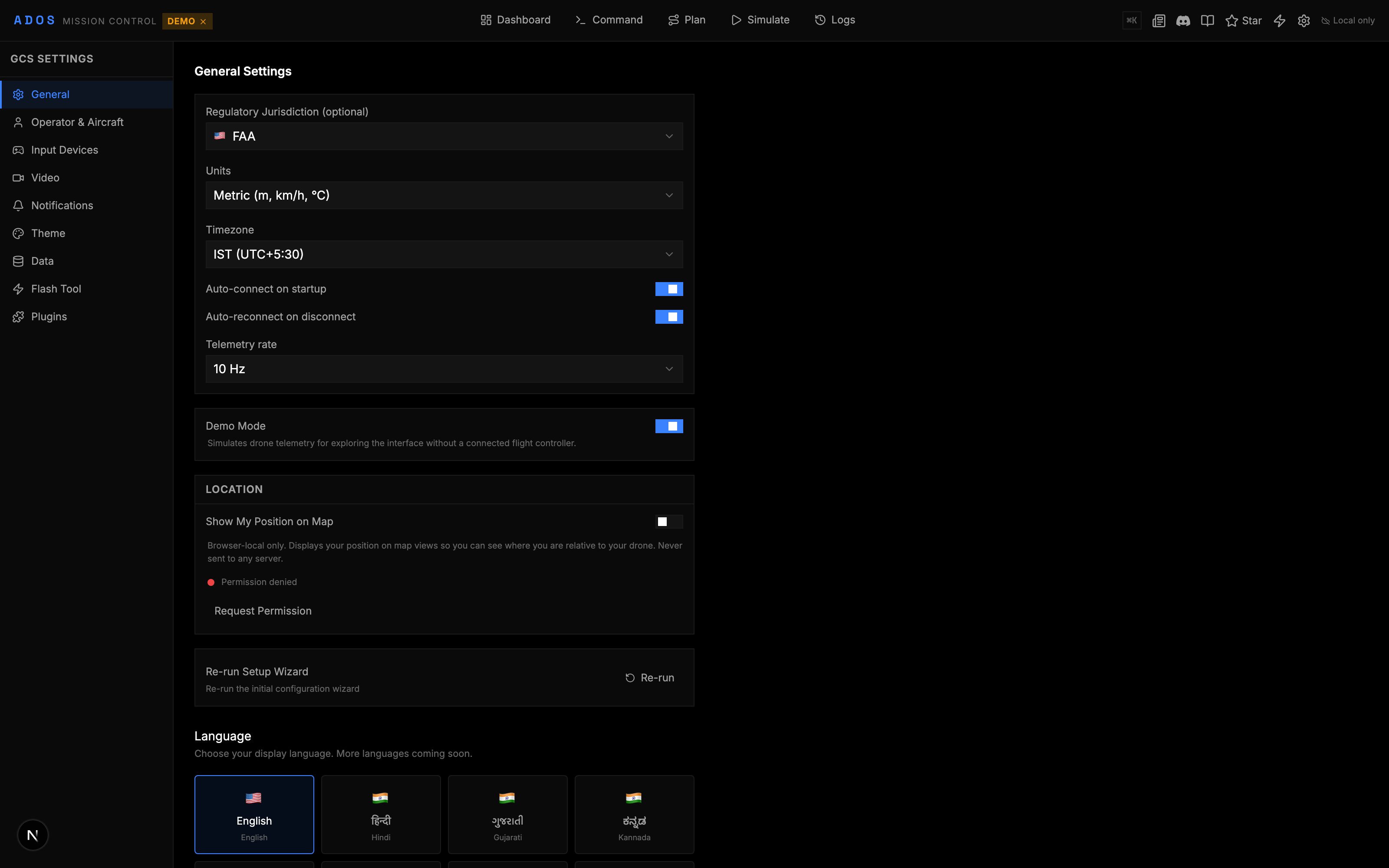
The Settings section lets you customize Mission Control's appearance, behavior, and personal preferences. All settings persist in IndexedDB across browser sessions.
 ## Settings Pages
Settings are organized into sub-pages under `/config`, reached from the settings gear in the top bar:
| Page | Route | Description |
| ------------- | ----------------------- | -------------------------------------------------------------------------------------------- |
| Theme | `/config/theme` | Visual appearance, color scheme, accent color |
| Video | `/config/video` | Video preferences, transport default, OSD |
| Input | `/config/input` | Gamepad mapping, keyboard shortcuts |
| Data | `/config/data` | Units, coordinate format, data management |
| Notifications | `/config/notifications` | Alert thresholds, sounds, telemetry warnings |
| Operator | `/config/operator` | Pilot profile, certifications, display name |
| Firmware | `/config/firmware` | Firmware flash settings (covered in [Firmware Flashing](/mission-control/firmware-flashing)) |
## Theme
Mission Control ships with 22 themes:
| Theme | Style |
| ----------------- | --------------------------------------------------------------------- |
| Dark (default) | Near-black background, electric blue accents |
| Light | White background for bright environments |
| Solarized Dark | Solarized color palette, dark variant |
| Solarized Light | Solarized color palette, light variant |
| NVG | Night vision green on black. Minimal brightness for night operations. |
| Dracula | Popular dark theme with purple and pink accents |
| Catppuccin Mocha | Warm dark theme |
| Catppuccin Frappe | Medium dark theme |
| Catppuccin Latte | Light warm theme |
| Nord | Arctic, cool blue palette |
| Gruvbox Dark | Retro warm dark theme |
| Gruvbox Light | Retro warm light theme |
| One Dark | Atom One Dark colors |
| Tokyo Night | Soft dark blues and purples |
| Rose Pine | Soft, muted palette |
| Monokai | Classic dark theme with vivid syntax colors |
| Kanagawa | Inspired by Katsushika Hokusai's artwork |
| Synthwave | Neon 80s aesthetic |
| GitHub Dark | GitHub's dark mode colors |
| Ayu Dark | Warm dark theme |
| Ayu Mirage | Balanced dark/warm theme |
| Everforest Dark | Nature-inspired greens |
### Accent Color
Choose from 9 accent colors that apply across the interface:
Blue, Green, Amber, Red, Lime, Purple, Pink, Cyan, Orange
The accent color affects buttons, active states, selection highlights, and status indicators.
## Language
Mission Control supports 16 languages:
| Language | Code |
| ---------- | ---- |
| English | en |
| German | de |
| Spanish | es |
| French | fr |
| Hindi | hi |
| Gujarati | gu |
| Kannada | kn |
| Marathi | mr |
| Punjabi | pa |
| Tamil | ta |
| Telugu | te |
| Indonesian | id |
| Japanese | ja |
| Korean | ko |
| Portuguese | pt |
| Chinese | zh |
Change the language from the settings page. The entire UI updates immediately without a page reload.
## Video Settings
Configure video feed behavior:
| Setting | Options | Description |
| -------------- | ------------------------------- | ------------------------------------------------------------------- |
| Transport mode | Auto, LAN Direct, P2P MQTT, Off | Default transport for the [video feed](/mission-control/video-feed) |
| OSD overlay | On / Off | Show telemetry overlay on the video |
| Auto-play | On / Off | Start video automatically when a drone connects |
## Input Configuration
### Gamepad Mapping
Customize which gamepad axes and buttons map to which flight controls:
* **Stick mapping:** Assign roll, pitch, throttle, yaw to specific axes
* **Deadzone:** Set the center deadzone for each axis (prevents drift)
* **Expo curve:** Apply an exponential curve for finer control near center
* **Button mapping:** Assign functions to gamepad buttons (arm, mode change, RTL)
### Keyboard Shortcuts
View and customize keyboard shortcuts for the entire application. The shortcuts page lists all available actions and their current key bindings.
## Units and Data
| Setting | Options |
| ----------------- | --------------------------------------------------- |
| Unit system | Metric (m, km/h, m/s) or Imperial (ft, mph, ft/min) |
| Coordinate format | Decimal degrees, DMS, UTM |
| Map tile source | OpenStreetMap, Satellite, Terrain, Dark |
### Data Management
* **Clear local data:** Remove all cached data from IndexedDB
* **Export settings:** Download your settings as a JSON file
* **Import settings:** Load settings from a JSON file
## Notifications
Configure when and how Mission Control alerts you:
| Alert | Default Threshold | Description |
| ----------------- | -------------------- | ------------------------------------------ |
| Low battery | 20% | Warning when battery drops below threshold |
| Critical battery | 10% | Urgent alert for very low battery |
| GPS degradation | \<3D fix | Alert when GPS fix is lost or degraded |
| Link quality | RSSI \< 50 | Warning for weak radio link |
| EKF warning | Variance > threshold | Alert for EKF estimation problems |
| Fence breach | Any breach | Alert when geofence is crossed |
| Telemetry stale | 10 seconds | Warning when telemetry stops updating |
| Telemetry offline | 30 seconds | Alert when telemetry is lost |
You can also configure:
* **Sound alerts:** Toggle audio notifications on or off
* **Alert history:** View past alerts in chronological order
## Operator Profile
Set your pilot profile information:
* **Display name:** Your name shown in community features and flight logs
* **Certification level:** Your drone pilot certification (informational, not enforced)
* **Organization:** Company or team name
* **Notes:** Free-text field for personal notes
The operator profile is stored locally and optionally synced to the cloud when authenticated.
## Jurisdiction
Set your operating jurisdiction to configure region-specific defaults:
* **Altitude limits:** Sets default maximum altitude based on local regulations
* **Distance limits:** Sets default maximum distance for geofence suggestions
Available jurisdictions include FAA (United States), DGCA (India), CASA (Australia), EASA (Europe), and ICAO (global fallback).
## Persistence
All settings are stored in IndexedDB using Zustand's persist middleware. This means:
* Settings survive browser restarts
* Settings are specific to the browser/device
* Clearing browser data resets all settings
* Cloud sync (when authenticated) can back up and restore settings across devices
Export your settings to a JSON file as a backup before clearing browser data or switching devices.
## Parameter Panel Settings
The parameter browser has its own settings for column visibility and filter presets. These are covered in the [Parameters](/mission-control/parameters) page.
## Settings Pages
Settings are organized into sub-pages under `/config`, reached from the settings gear in the top bar:
| Page | Route | Description |
| ------------- | ----------------------- | -------------------------------------------------------------------------------------------- |
| Theme | `/config/theme` | Visual appearance, color scheme, accent color |
| Video | `/config/video` | Video preferences, transport default, OSD |
| Input | `/config/input` | Gamepad mapping, keyboard shortcuts |
| Data | `/config/data` | Units, coordinate format, data management |
| Notifications | `/config/notifications` | Alert thresholds, sounds, telemetry warnings |
| Operator | `/config/operator` | Pilot profile, certifications, display name |
| Firmware | `/config/firmware` | Firmware flash settings (covered in [Firmware Flashing](/mission-control/firmware-flashing)) |
## Theme
Mission Control ships with 22 themes:
| Theme | Style |
| ----------------- | --------------------------------------------------------------------- |
| Dark (default) | Near-black background, electric blue accents |
| Light | White background for bright environments |
| Solarized Dark | Solarized color palette, dark variant |
| Solarized Light | Solarized color palette, light variant |
| NVG | Night vision green on black. Minimal brightness for night operations. |
| Dracula | Popular dark theme with purple and pink accents |
| Catppuccin Mocha | Warm dark theme |
| Catppuccin Frappe | Medium dark theme |
| Catppuccin Latte | Light warm theme |
| Nord | Arctic, cool blue palette |
| Gruvbox Dark | Retro warm dark theme |
| Gruvbox Light | Retro warm light theme |
| One Dark | Atom One Dark colors |
| Tokyo Night | Soft dark blues and purples |
| Rose Pine | Soft, muted palette |
| Monokai | Classic dark theme with vivid syntax colors |
| Kanagawa | Inspired by Katsushika Hokusai's artwork |
| Synthwave | Neon 80s aesthetic |
| GitHub Dark | GitHub's dark mode colors |
| Ayu Dark | Warm dark theme |
| Ayu Mirage | Balanced dark/warm theme |
| Everforest Dark | Nature-inspired greens |
### Accent Color
Choose from 9 accent colors that apply across the interface:
Blue, Green, Amber, Red, Lime, Purple, Pink, Cyan, Orange
The accent color affects buttons, active states, selection highlights, and status indicators.
## Language
Mission Control supports 16 languages:
| Language | Code |
| ---------- | ---- |
| English | en |
| German | de |
| Spanish | es |
| French | fr |
| Hindi | hi |
| Gujarati | gu |
| Kannada | kn |
| Marathi | mr |
| Punjabi | pa |
| Tamil | ta |
| Telugu | te |
| Indonesian | id |
| Japanese | ja |
| Korean | ko |
| Portuguese | pt |
| Chinese | zh |
Change the language from the settings page. The entire UI updates immediately without a page reload.
## Video Settings
Configure video feed behavior:
| Setting | Options | Description |
| -------------- | ------------------------------- | ------------------------------------------------------------------- |
| Transport mode | Auto, LAN Direct, P2P MQTT, Off | Default transport for the [video feed](/mission-control/video-feed) |
| OSD overlay | On / Off | Show telemetry overlay on the video |
| Auto-play | On / Off | Start video automatically when a drone connects |
## Input Configuration
### Gamepad Mapping
Customize which gamepad axes and buttons map to which flight controls:
* **Stick mapping:** Assign roll, pitch, throttle, yaw to specific axes
* **Deadzone:** Set the center deadzone for each axis (prevents drift)
* **Expo curve:** Apply an exponential curve for finer control near center
* **Button mapping:** Assign functions to gamepad buttons (arm, mode change, RTL)
### Keyboard Shortcuts
View and customize keyboard shortcuts for the entire application. The shortcuts page lists all available actions and their current key bindings.
## Units and Data
| Setting | Options |
| ----------------- | --------------------------------------------------- |
| Unit system | Metric (m, km/h, m/s) or Imperial (ft, mph, ft/min) |
| Coordinate format | Decimal degrees, DMS, UTM |
| Map tile source | OpenStreetMap, Satellite, Terrain, Dark |
### Data Management
* **Clear local data:** Remove all cached data from IndexedDB
* **Export settings:** Download your settings as a JSON file
* **Import settings:** Load settings from a JSON file
## Notifications
Configure when and how Mission Control alerts you:
| Alert | Default Threshold | Description |
| ----------------- | -------------------- | ------------------------------------------ |
| Low battery | 20% | Warning when battery drops below threshold |
| Critical battery | 10% | Urgent alert for very low battery |
| GPS degradation | \<3D fix | Alert when GPS fix is lost or degraded |
| Link quality | RSSI \< 50 | Warning for weak radio link |
| EKF warning | Variance > threshold | Alert for EKF estimation problems |
| Fence breach | Any breach | Alert when geofence is crossed |
| Telemetry stale | 10 seconds | Warning when telemetry stops updating |
| Telemetry offline | 30 seconds | Alert when telemetry is lost |
You can also configure:
* **Sound alerts:** Toggle audio notifications on or off
* **Alert history:** View past alerts in chronological order
## Operator Profile
Set your pilot profile information:
* **Display name:** Your name shown in community features and flight logs
* **Certification level:** Your drone pilot certification (informational, not enforced)
* **Organization:** Company or team name
* **Notes:** Free-text field for personal notes
The operator profile is stored locally and optionally synced to the cloud when authenticated.
## Jurisdiction
Set your operating jurisdiction to configure region-specific defaults:
* **Altitude limits:** Sets default maximum altitude based on local regulations
* **Distance limits:** Sets default maximum distance for geofence suggestions
Available jurisdictions include FAA (United States), DGCA (India), CASA (Australia), EASA (Europe), and ICAO (global fallback).
## Persistence
All settings are stored in IndexedDB using Zustand's persist middleware. This means:
* Settings survive browser restarts
* Settings are specific to the browser/device
* Clearing browser data resets all settings
* Cloud sync (when authenticated) can back up and restore settings across devices
Export your settings to a JSON file as a backup before clearing browser data or switching devices.
## Parameter Panel Settings
The parameter browser has its own settings for column visibility and filter presets. These are covered in the [Parameters](/mission-control/parameters) page.