

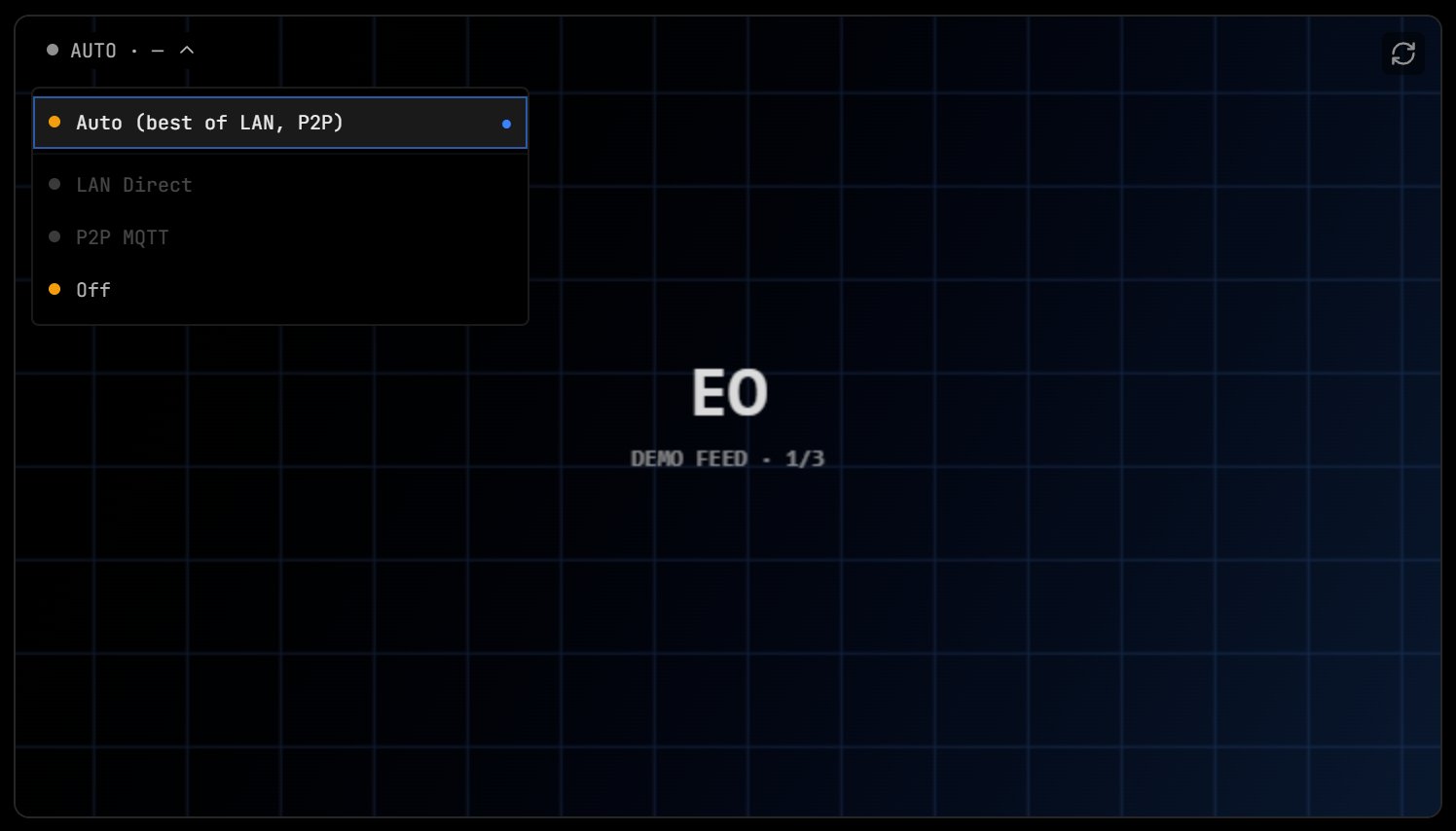
The video card with the transport switcher open.
Where video appears
- Cockpit tab: full-screen video under the HUD. A drone with several cameras shows stream tabs (keys 1 to 9) and a picture-in-picture inset (key P). See Cockpit and Skills.
- Overview tab: a video card for the drone, with the transport switcher.
- Ground station Overview: a video card for the drone the ground station receives.
- Grid view: a live tile per node, up to four playing at once.
- Swarm view: a video rail for the selected hero drone.
Transports
The video card’s transport switcher has four options:
The pill on the card shows the active transport (for example AUTO · LAN DIRECT), the link latency, and states such as CONNECTING…, RETRYING IN s or AUTO · FAILED. Your choice persists across sessions.
Auto cascade
- LAN Direct, with a 10 second timeout. Skipped when Mission Control is served over HTTPS, because the page cannot fetch the agent’s plain-HTTP endpoint.
- P2P MQTT, with a 35 second timeout (broker connect, answer and first frame).
- If both fail, the pill reads AUTO · FAILED and the menu shows each transport’s error.
LAN Direct
Mission Control uses the WHEP URL the agent advertises, served on the agent’s port 8080 at/whep (or /whep?camera=<id> for a specific camera), and sends the pairing key with the request. For a drone at 192.168.1.50 the URL is http://192.168.1.50:8080/whep.
Full-rate video while you watch
A drone that shares the WFB radio channel boots on the low-ratethumbnail profile (320x180 at 1 fps), so a fleet powering up together does not flood the channel. When you open a detail view of that drone over LAN Direct (the Overview video card, the Cockpit, or a feed on its Agent tab), Mission Control asks the agent for the full-rate hero profile with a 30-second lease and renews it every 15 seconds. About 5 seconds after the last of those views closes, it releases the lease and the drone returns to its base profile. A closed or crashed tab simply stops renewing, so the lease lapses on its own. Grid tiles never take a lease, and a ground station is never promoted. The lease call is POST /api/video/profile; see Video pipeline.
ICE
The agent’s WebRTC media uses UDP port 8189 on every interface. On the LAN profile it offers host candidates only. The cloud-relay profile adds five STUN servers (stun.l.google.com, stun1.l.google.com and stun2.l.google.com on 19302, stun.cloudflare.com and global.stun.twilio.com on 3478) and a TCP candidate on 8189. Candidate gathering times out after 2 seconds.
Expected latency per path is on Video stack.
Video card controls
- Capture screenshot: saves a still frame.
- Start recording / Stop recording: records the stream in the browser, with a REC indicator in the frame.
- Picture in picture: the browser’s floating video window.
- Enter fullscreen / Exit fullscreen.
- Reconnect video.
- Pop out video: opens the video in its own window.
On a ground station screen
For an HDMI screen on a ground station, use the agent’s own on-box cockpit athttp://<node>:8080/cockpit/ (add ?kiosk=1 for kiosk mode). See HDMI kiosk.
Troubleshooting
The pill shows AGENT VIDEO STOPPED or the video is black
The pill shows AGENT VIDEO STOPPED or the video is black
On the agent, run
ados diag video and check that a camera is detected and the video service is running. See Video pipeline.P2P MQTT fails
P2P MQTT fails
The agent must be paired to your account and the MQTT broker reachable from both ends. Symmetric NAT blocks the peer-to-peer media path.
High latency on LAN Direct
High latency on LAN Direct
Check for Wi-Fi congestion and the node’s encoder settings. Compare against the figures on Video stack.
Next steps
Cockpit and Skills
Fly with video, the HUD and stream tabs.
Video stack
How video flows from camera to browser.