

ados command runs on every node. It opens the terminal dashboard, reports status, pairs and unpairs the node, updates and uninstalls the agent, and inspects or tunes hardware, logs, networking, extensions, the profile, the radio link and recordings.
Most flight-operations settings (MAVLink, video, network, remote access, ground-station role) live in the browser dashboard and in Mission Control. The CLI is for status, recovery and scripting.
This page covers the ados command on the node. Building and signing extensions uses the same ados plugin group; the authoring commands and exit codes are on Plugin CLI reference.
All commands
Behaviour the table does not show:
ados --versionprints the same value asados version.ados pairwithout options shows this node’s Mission Control pairing information.ados pair --role <drone|gs>binds the WFB radio in that role instead. See Pairing and WFB-ng pairing.ados unpair --radioalso wipes the WFB bind;--allreleases both.ados support-bundlewrites one redacted archive locally and sends nothing anywhere.-o <path>chooses where it lands.ados update --profile <drone|ground-station|workstation|compute>re-runs the upgrade against a different node profile. On a drone or ground station the update is refused while the vehicle is armed or its arm state is unknown;--force-armedoverrides that refusal here and in the installer. See Updating.ados install --statusandados install --resumeform a hidden, advanced command.--statusshows the last install result and which checkpoints are done or missing;--resumere-runs the installer to finish a partial install.
Subgroups
Every subgroup except
ados logs is hidden from ados --help so the first-run surface stays short. All of them are supported, and ados <group> --help works for each one.ados
Run ados on the node or over SSH:
a (install radio driver, pair, logs, radio status, update, restart radio, unpair, reboot). Press q or Ctrl-C to exit.
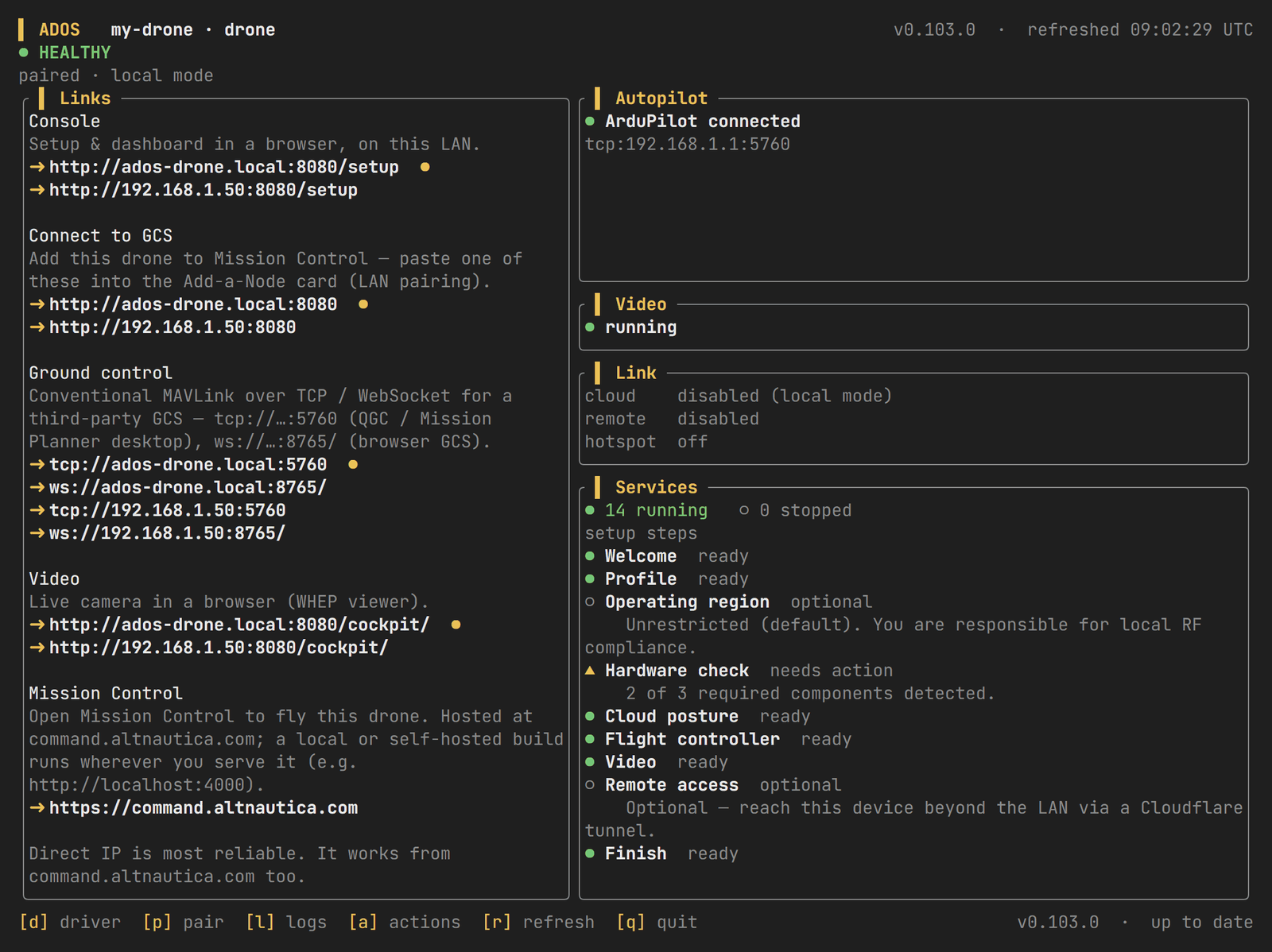
The terminal dashboard on a drone node.
ados logs tail. With the Black Box store off (the default), it prints how to follow journalctl -u ados-supervisor -f instead.
Without a TTY, ados prints the same summary as ados status.
ados status
A short, support-friendly summary:
ados update and ados uninstall
ados update re-runs the installer in upgrade mode. It updates the daemons and the CLI and keeps the device identity and config. --check-only reports the current and latest version without installing, and --json prints current_version, latest_version and update_available. See Updating for platform behaviour and rollback.
ados uninstall removes the agent. --purge removes the config as well, and --yes skips the prompt:
ados plugin
ados plugin drives the extension host through the agent’s /api/plugins routes. Each extension runs as its own unit (a systemd unit with cgroup limits on Linux, a LaunchAgent on macOS) with a capability-gated IPC channel.
In more detail:
ados plugin install <source>takes a local.adosplugpath, an HTTPS archive URL on the agent’s download allowlist, a built-in plugin id, or a first-party catalog id such ascom.altnautica.world-engine. It shows the requested permissions and grants the ones you approve.enableadds the extension to the supervisor’s restart set anddisableremoves it; both take effect at runtime.removepurges on-disk state unless--keep-datais passed.ados plugin perms <id> --grant <perm>grants a declared permission and--revoke <perm>drops one, at runtime.ados plugin logs <id>prints the last 100 lines of the extension’s stdout and stderr (--lines N,--follow).--service <name>reads a declared service’s log instead of the main runner’s.pin,unpinandauto-update <id> <on|off>control auto-update per extension.lint,test,signandkeygenare authoring aids.keygenmakes a developer key, not a production publisher key.
install and perms --revoke ask for confirmation. Pass --yes to skip it. install --yes refuses high- or critical-risk permissions; grant those interactively or with ados plugin perms <id> --grant <perm>. enable, disable and remove do not prompt.
The operator guide is Plugins. Signing keys are covered on Signing keys.
ados diag
Per-hop verdicts on the subsystems that fail most often. Reach for these before journalctl: each one reports what it measured and how.
ados diag link reports the decode verdict and the pairing state separately. A box can be paired and decoding nothing, and the two answers point at different faults. When neither end measured packet loss it says so, rather than reporting zero loss.
ados diag storage reads back wear the box records continuously. Check it first on a node that reboots on its own: undervoltage and thermal throttling both show up there. See Drone Agent diagnostics.
ados hardware
udev runs
ados hardware bust-cache on USB add and remove so the next API call re-probes.
ados logs
Query the Black Box store: logs, telemetry history, discrete events and hardware samples in a local database that survives reboots.
The store is off by default. With it off, these commands print how to read the journal instead (
journalctl -u ados-supervisor -f, or any ados-* unit), which is the log of record. Turn it on with logging.store.enabled: true; see Black Box.
ados logs push uploads to your paired cloud account. For a support case use ados support-bundle, which writes a redacted archive locally and sends nothing.
ados logs status --openapi prints the OpenAPI document of the log query API.
ados network
ados network regulatory region <CC> takes an ISO 3166-1 alpha-2 code (for example US, DE) and applies after a restart. ados network regulatory unrestricted clears the pin, which is the default posture.
ados network ap-passphrase reads /etc/ados/ap-passphrase and prints the value on its own line, so it works in a script or a pipe without a TTY. It never generates one: asking a unit that has never started its access point is an error. The file is mode 0600, so run it as root. The terminal dashboard shows the same value in its Link panel. See Regulatory for the region posture.
ados profile
The installer accepts four profiles (drone, ground_station, workstation, compute). ados profile set persists only the two flight profiles; a workstation or compute node is chosen at install time with --profile. See Node profiles.
ados profile set ground_station --role <direct|relay|receiver> sets the ground-station role; --no-restart skips the restart of profile-sensitive units.
ados radio
ados radio set-tx-power is refused above tx_power_max_dbm. ados radio pair local opens a local over-radio bind window; run it on both nodes within the window. ados radio pair auto on re-arms auto-pair only while unpaired.
TX power limits, channels and link automation are on WFB-ng. Binding is on WFB-ng pairing.
ados config
Inspect and migrate /etc/ados/config.yaml. A migration runs under the config lock and keeps keys the current schema does not know.
ados config migrate --check reports what would change and writes nothing.
See Configuration.
ados mcp
Token acceptance at the LAN auth edge is off by default. A minted token is honoured only after ados mcp enable.
ados mcp enable and disable need sudo; --no-restart writes the config without restarting the control front. ados mcp mint requires --scope (repeatable); --ttl-days defaults to 30 and --node adds an advisory fleet-connector allowlist. ados mcp revoke --all revokes every token by rotating the salt.
Scopes are read, safe_write, admin, flight, destructive and secret_read. See MCP server.
ados record
Recording is continuous and segmented, so
clip cuts from segments already on disk rather than starting a new capture. See Video pipeline.
Next steps
Terminal dashboard
The live view
ados opens in a terminal.REST API
The HTTP API the CLI and Mission Control call.
Drone Agent diagnostics
Read
ados diag verdicts in depth.Configuration
The config file and its schema.