

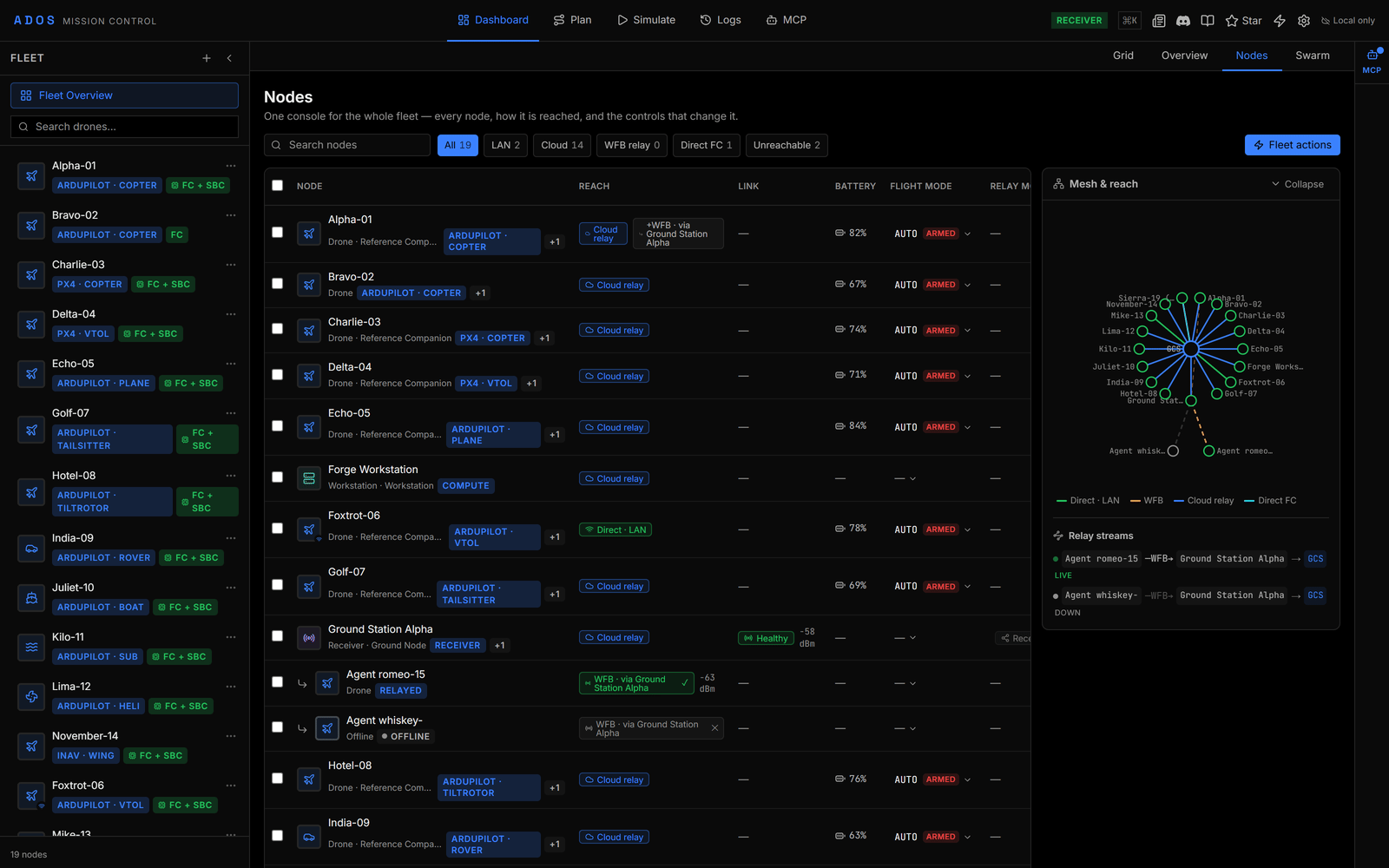
The Nodes view with the Mesh & reach panel open.
Nodes view
Reach
Every node is shown with the path Mission Control uses to reach it, so a direct link, a cloud link and a relayed link never look alike.
A node reachable by a second path shows a secondary chip such as +WFB. The toolbar filters by reach: All, LAN, Cloud, WFB relay, Direct FC and Unreachable, each with a count, next to a Search nodes box.
The table
One row per node. A drone reached through a ground station is indented under it. The columns are:- Node: profile glyph, name and badges.
- Reach: the bearer chips above.
- Link: the agent’s link diagnosis and RSSI.
- Battery: level with a colour band.
- Flight mode: a dropdown with Stabilize, Alt Hold, Loiter, Guided and Auto.
- Relay mode: a ground station’s mesh role, Direct, Relay or Receiver. Only a ground station holds a mesh role, and the role is written to it over the LAN only.
- Last seen: Live, Stale or Offline, with an age.
- Actions: the per-node menu.
Per-node actions
The Actions menu holds:- Flight actions: Arm, Disarm, Return to Home, Land, Pause, Resume and Kill Motors. They are Skills, so each uses its usual confirmation. An action the node cannot take now is disabled with the reason.
- Open cockpit (drones), Configure (the node’s Agent tab, Profile page) and View logs.
- Unpair, which releases the pairing and removes the node from the fleet until you pair it again.
Bulk and fleet actions
Tick rows to open the bulk bar. Flight action offers the five mode presets, Return to Home and Land, each labelled with how many of the selected nodes are ready. Arm is never offered in bulk. Confirm by typing the phrase the dialog asks for; nodes that cannot take the command are left out and named. Fleet actions in the toolbar has Return all to launch, which sends Return to Home to every node that can take it after a typed confirmation, and Add a node, which opens the Connect to Drone dialog. Each command travels over whichever path reaches the node: the LAN, the cloud config path, or, for a drone reached only over the radio, the tunnel through its ground station.Mesh & reach
The Mesh & reach panel on the right draws the fleet as a node-to-node map. Colour marks the bearer. Below it, Relay streams lists each relayed path end to end with its state (Live, Unverified, Stale or Down). In the demo fleet, the stream for Romeo-15 runs over WFB to Ground Station Alpha and then to the GCS. When every node reaches Mission Control directly, the list reads No relay streams: every node reaches home directly.Honest states
A node whose telemetry has gone stale renders a stale state instead of a confident row, and a radio link without confirmed reception shows as unverified, not green. A control that cannot act on a node is disabled with the reason.Swarm view
The Swarm view shows one row per fleet slot, driven by the swarm-bus beacons (see Swarm bus).- Severity strip: chips for no beacon, beacon lost, emergency, warning and armed, plus conditions such as hard separation, low battery, weak link, slot conflicts and rejected replayed beacons.
- Table: Slot, Node, State, Governing, Formation, Task, Battery, RSSI, Beacon, Hero and Actions. Unhealthy slots sort first.
- Positions: a map of every slot with a fix. Turn on Select and drag a rectangle to select drones.
- Video: pick a Hero drone to give it the full-rate video budget.
- Flight action: Pause, Return to Home and Land. Arm, disarm and kill are never offered here.
- Set formation: Line, Column, Wedge, Grid or Circle, written to each drone’s configuration.
- When the selection is the whole fleet, click Broadcast first. It arms the menus for 5 seconds.
Next steps
Node configuration
The Agent tab pages behind Configure.
Ground station node panel
Set a ground station’s mesh role and manage its radio.
Transitive enrollment
How a drone reached over the radio becomes its own node.
Mesh overview
The ground mesh whose links the map draws.